FAQs
About Data Privacy
What is personal data?
Personal data is any information that relates to an identified or identifiable living individual. Different pieces of information, which collected together can lead to the identification of a particular person, also constitute personal data.
Examples of personal data:
• a name and surname;
• a home address;
• an email address such as name.surname@company.com;
• an identification card number;
• an Internet Protocol (IP) address
 Anonymized data, or a company registration number are NOT considered personal data.
Example of supported law
The General Data Protection Regulation (GDPR) is a European law directly applicable as of May 25th 2018 in all European member states.
Click here for official information on the GDPR.
Click here for the full text of the regulation.
This is only an example, as HOPEX Privacy Management supports all kinds of data-protection laws.About Processing Activities
For general information on processing activities, see Describing Processing Activities.Why can't I create a processing activity ?
The functional administrator must have assigned you to a department.
For more information, see Connecting Users to a department.
Why is the dashboard of my processing activity empty?
The indicators displayed at the top of the Overview tab of the processing activity remain gray/empty until you perform a pre-assessment or a DPIA.
For more information, see Processing Activity Dashboard.
How can I produce a Word version of my record of processing?
An application is involved in one of my processing activity. I need to describe specifically how this part of the processing activity is handled. What should I do?
HOPEX Privacy Management enables you to describe processing elements of application type. For more information, see Managing Processing Activity Elements.
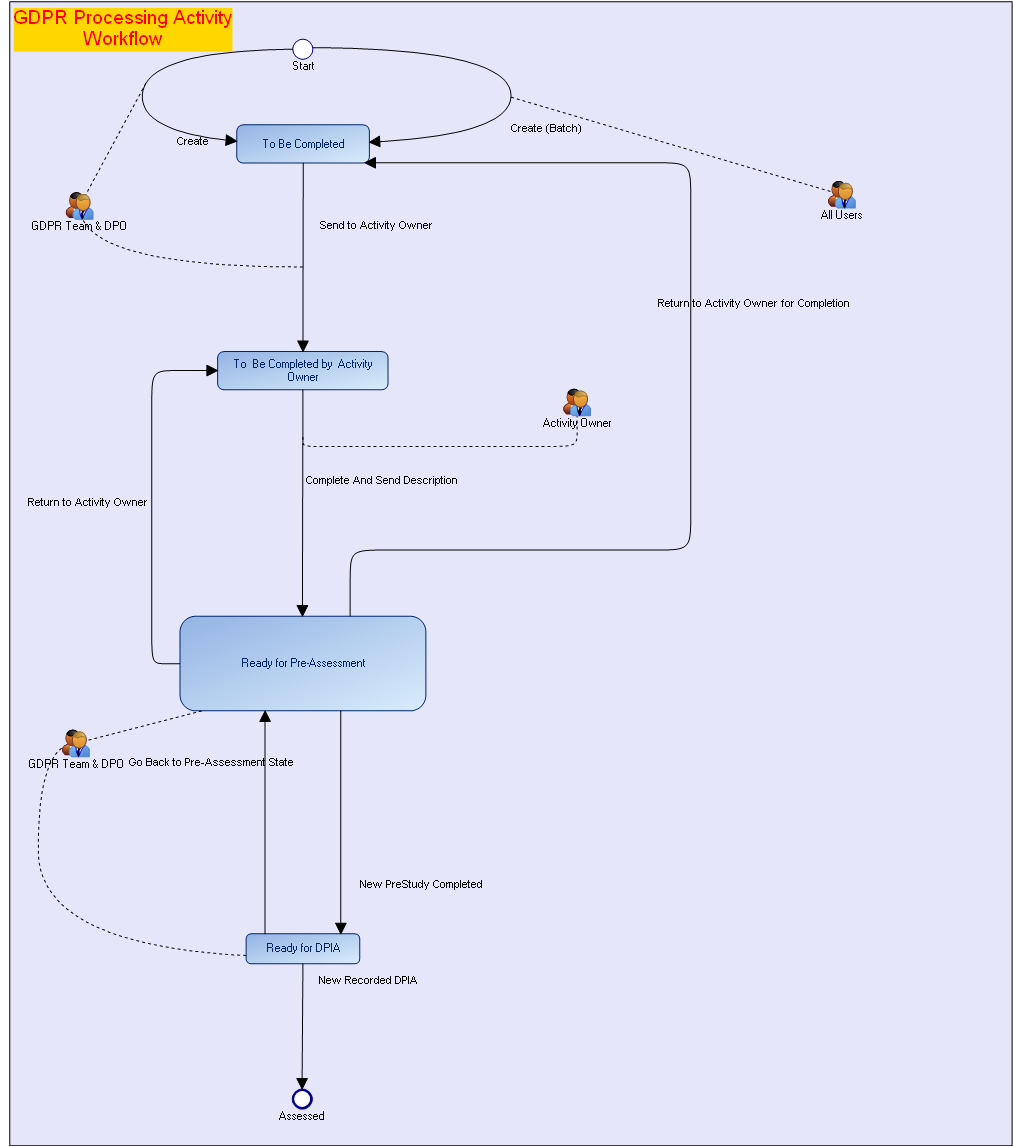
What are the possibilities offered by the standard processing activity workflow?
About Assessments
For more information on assessment, see Assessing Processing Activities.How do I know which processing activities need to be assessed ?
To identify the processing activities you need to assess, we suggest you to take a look at the following:
• the compliance level of your processing activities
This information concerns the processing activity before any proper assessment is made.This information concerns the processing activities which have already been assessed.• the final risk level of your processing activities
• the assessement status (DPIA)
Is it possible to carry out a DPIA outside the solution?
Yes, it is possible.
We suggest you to proceed as follows to reference the DPIA in HOPEX Privacy Management:
1. Create a DPIA without adding risks or recommendations.
2. Attach your external DPIA.
3. Fill in the validation levels and specify what needs to be done next.
For more information on DPIA creation, see Performing Impact Assessment (DPIA).How can I produce a Word version of a DPIA ?
You have two ways to generate a Word document out of your DPIA:
• From Reports > Record of DPIAs.
For more information, see Record of DPIAs.• From the DPIA tab of the processing activity property page.
For more information, see Generating a DPIA document.Some of my processing activities are similar. Can I reuse an existing DPIA?
Yes, you can. You can duplicate a processing activity then make the necessary changes.
For more information, see Reusing a DPIA.How is the Final Compliance Level computed?
This field is available in the Preassessment or DPIA page of a processing activity. See Performing the Pre-Assessment. See also Specifying Compliance Levels.
Final Compliance Level: sum of conformance levels / 5. The result is rounded to the closest (and highest) integer.
Compliance levels can be specified on the following:• Legal Basis
• Data Minimization
• Data Subjects' rights & Notice Management
• Data Transfers
• Security Measures
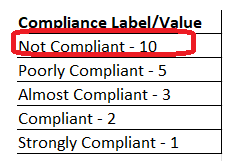
In the example below, final compliance level = (10+10+10+5+5)/5 = 8

Let's compare the result obtained with the possible compliance level values:
8 is closer to 10 (Not compliant) than 5 (Poorly compliant)
-> Final Compliance Leval = Not compliant
How is the Final Risk Level computed?
This field is available in the Preassessment or DPIA page of a processing activity. See Performing the Pre-Assessment. Final Risk Level: Final Compliance Level -1
The result is rounded to the closest (and lowest) integer.
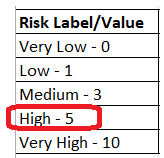
If Final Risk Level = 7, Final Risk Level = "High" as 7 is closer to 5 (High) than 10 (Very High)
How is the "Subsequent Actions" field computed?
This field is available in the Preassessment or DPIA page of a processing activity. See Performing the Pre-Assessment. See also: How is the Final Risk Level computed?
Final Risk Level (Preassessment) | "Subsequent Actions" field value |
|---|---|
5 | Run DPIA |
10 | Run DPIA |
Other | Other |
Final Risk Level (DPIA) | "Subsequent Actions" field value |
|---|---|
5 | Notify Supervisory Authority |
10 | Notify Supervisory Authority |
Other | Other |
About Transfers
How can I create transfers?
Transfers need to be created in the Details tab of a processing activity.
Is there a way to view transfers graphically ?
Yes, HOPEX Privacy Management enables you to display a cross-border transfer map for a specific processing activity.
For more information, see:
I created transfers but I cannot display the cross-border transfer map. What's wrong ?
Also, make sure you refreshed the report after creating transfers on processing activities.