Actions on an Object in a List
In an object list:
• when you click an object, its proprieties display over the list itself
• other actions on an object are available:
• (after selecting the object) in the menu bar of the list
• when you hover the cursor over the Local Name column of the object
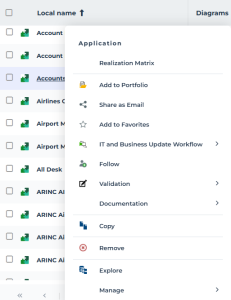
• when you right-click the object row, in the object conextual menu
Actions on an object using the menu bar of a list
When you select an object in a list of objects, the menu bar of the list enables you to perform general actions on the object.
 To access all the actions available on an object, see Object pop-up menu.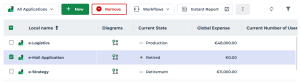
Icon | Actions on the object | For more details, see: |
|---|---|---|
 | Delete the object from the HOPEX repository | |
 | Access the object Workflows and launch a workflow transition on the object | |
 | Run an instant report on this object | |
 | Export the selected object in Excel format |
Click More  to access hidden actions.
Actions on an object from the Local Name of a list
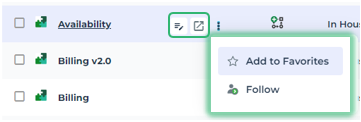
In a list of objects, when you hover the cursor over the Local Name of an object, a list of buttons pops up:
• In the first part of the list, you can perform current actions on the object.
• The second part of the list gives you direct access to features related to this object.
Icon | Action on the object | For more details, see: |
|---|---|---|
 | Display the properties of the object in the edit area | |
 | Display the object properties in a new tab | |
 | Add the object to your favorites | |
 | Follow the object | |
 | Access diagrams containing the object |
Object pop-up menu
To access all the commands specific to an object in a list:
 Right-click the object row and in its pop-up menu, select the action.