Participating in a Workflow
After initiation of a workflow, only those users assigned to the next workflow status can intervene in this workflow.
 Any HOPEX user can participate in a workflow, whatever the product used.
 You can trigger a workflow transition:
• From the list of workflows that are of interest to you
• an object list
From the list of workflows that concern you
To take part in a workflow:
1. Access the workflows which are of interest to you.
For more details, see Consulting Workflows.See also Starting a Workflow.2. If you are assigned to the next workflow status, the workflow appears in the "My Active Workflows" page.
3. Select the workflow of interest.
4. Roll the mouse over the Local name column of the object, click More  and select Workflows.
and select Workflows.The workflow window appears to the right.
5. To switch the workflow to the next status, click Mark the step Completed.
6. Select the transition that you want to trigger and click Next.
7. Enter a comment for this transition and select a user, then click Finish.
From a list of objects
To participate in a workflow from a list of objects:
1. Select the object on which you want to perform an action and click the Workflow button on the list bar.
2. Select the workflow on which you want to perform an action and the transition to be triggered.
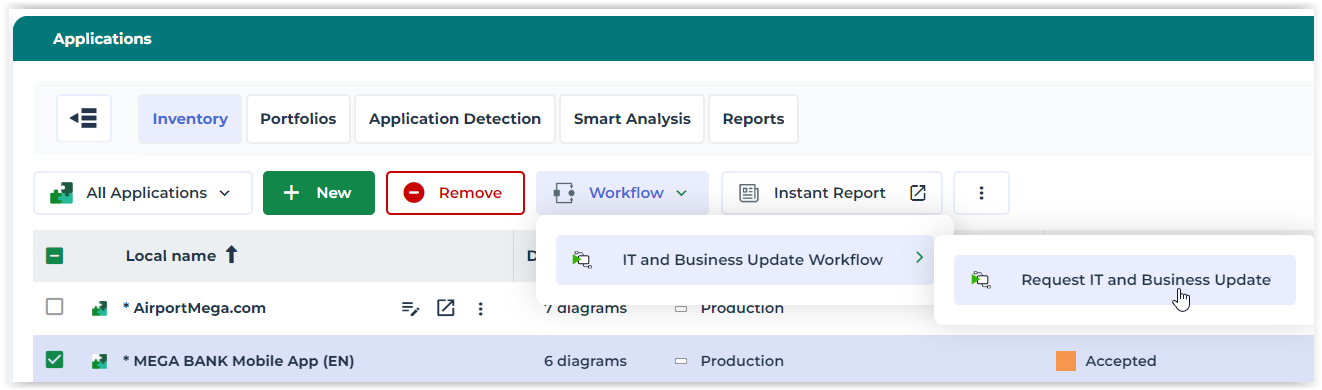 You can select more than one object and move these objects on to the next workflow step if these objects all have the same status. To do this, click on the workflow button and select Mass Transition.