Classes
Definition: Class
A class is described by a list of attributes and operations.
A class is linked to other classes via associations. The set of classes and associations forms the core of a class diagram.
We can illustrate the class concept by comparing classes to index cards filed in drawers.
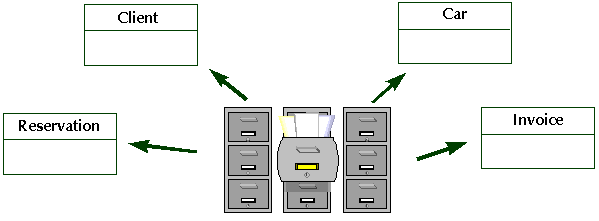
Classes can be technical objects used for programming.
Examples: dialog box, rectangle, string, table, etc.
Classes can represent technical objects used in industry.
Examples: Alarm, Sensor, Zone
Classes can also represent business objects:
Examples: customer, order, product, person, company, etc.

A class can also express a process, such as “Confirm client request”, or implement a business rule, such as “Consistency in cost accounts”.
Creating a Class
To create a class:
1. In the class diagram, click Class  in the insert toolbar.
in the insert toolbar. 2. Click in the diagram.
The Add Class dialog box opens.
3. Enter the Name of the class and click the Add button.
The class is then placed in the diagram.
You can use the complete name of a class throughout by adding the name of the package to which it belongs to its name, separated by two colons.
Example:
Enterprise::Sales Management::Client.
If one of the packages in the name does not exist, it is automatically created and linked to the class.
Finding an existing class
To find an existing class:
1. In the Add Class dialog box, select List in the drop-down list box using the arrow.
The list of classes appears.
2. Select the desired class and click OK.
The name of the selected class appears in the Add UML Class dialog box
3. Click Add.
The class then appears in the drawing.
Class Properties
The properties displayed depend on the class stereotype.
To open the Properties dialog box of a class:
 Select the class concerned and click the associated Properties button in the edit window.
It contains several pages where you can define the class properties.
Class characteristics page
 See also the metamodel Help: Classes
The Characteristics page is used to enter different characteristics of the class:
• Its Name, which you can modify.
• The owner of the class (for example, the package).
• The Visibility of the class (as related to its package):
• “Public”: the class is visible to any element outside the package. This is the default visibility.
• “Protected”: the class is visible to elements that inherit it or have import dependencies with it, and to friends.
• “Private”: the class is only visible to elements that have import dependencies with it and to friends.
• "Not specified".
 Friends of a class are the classes that are authorized to access its internals. It is possible to specify the friends of a class in the complements tab of the properties dialog box of the class.
• Comment: Comments can be used to add key information to diagrams when certain details cannot be displayed in the drawing. These comments are included in the document describing the class diagram.
The other characteristics you can specify are the abstraction, persistence, and activity:
• If the class Is Abstract, it has no instances. It is only used to group operations or attributes common to its subclasses.
• Persistence specifies whether the objects in the class need to exist after the process or thread that created them, or whether they only last as long as the processing.
• Instances of a class which Is Active are able to trigger control flows without user intervention.
Example: An instance of the printer class can send an "Out of paper" message to the network administrator screen.
• An IsRoot class is a class that has no superclasses in the tree of class generalizations.
• An IsLeaf class is a class that has no subclasses in the tree of class generalizations.
You can also specify the Parameters of a parameterized class (for C++).
Other properties pages
Other pages allow you to define or view:
• Attributes of a class (see Attributes)
• Operations of a class (see Operations)
• Associated classes (see Associations)
• Instances of a class (see Object Diagram)
• Redefined elements
Class Stereotype
A stereotype is a type of modeling element that extends the semantics of the metamodel. Stereotypes must be based on existing types or classes whose structure they use. Other stereotypes can be created by the user.
Stereotypes available for a class are:
• Org-Unit: represents the role played by something or someone within the enterprise environment of the modeled system.
• Auxiliary:class that supports another central or fundamental class, generally by implementing a secondary logic or a control flow.
• Implementation class: is used to characterize the classes needed for physical implementation of the system.
• Metaclass: class of which the instances are themselves classes. As a general rule, metaclasses are used to build metamodels.
• Control: is used for classes that perform processing internal to the system. These generally require contributions from several classes.
• Entity: enables description of classes that are passive; that is that do not initiate interactions on their own. They can participate in in several use cases and generally outlive any single interaction. They represent objects shared between the different actors that handle them.
• Enumeration: datatype containing a list of tabulated values.
• Expression: expressions of complex datatypes based on types.
• Focus: class that defines the main logic or control flow for the auxiliary class(es) that support it.
• Boundary: used to describe classes that are in direct contact with the system environment. Man-machine interfaces are of this type.
• Interface: an interface is a named set of operations that describe the behavior of an element. In particular, an interface represents the visible part of a class or package in a contractual client-supplier type relationship.
These are interfaces between the different components of the computer system. These are not interfaces with system users, as those are considered boundary stereotypes. See Specifying Interfaces for further information. • Worker: represents a human actor who interacts with the system. A worker interacts with other workers and manipulates entities while participating in use case realizations.
• Case worker: a case worker interacts directly with actors outside the system.
• Internal worker: an internal worker interacts with other workers and other entities within the system.
• PowerType: metatype of which instances are sub-types of another type.
• Structure: class that describes a structure used in the programs.
• Thread: stereotype used in implementation of an active object as a light business process.
• Primitive Type: used to describe the datatypes.
• Utility: a class of this stereotype groups global variables and procedures useful for programming, and described as attributes and operations of this class.
• Schema group: class describing a type of XML element, the sub-elements of which form a group.
• XML Document Definition Root: class that describes the structure of a message exchanged between two systems using the XML language syntax.
Stereotype display option
An option allows you to display stereotypes in the navigation window of objects.
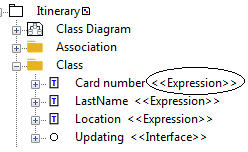
To activate this option:
1. Open the Options window.
2. In the left pane of the options window, select the Workspace folder.
3. In the right pane, select the option Display stereotype of UML objects in navigator.
4. Click OK.