Specifying Interfaces
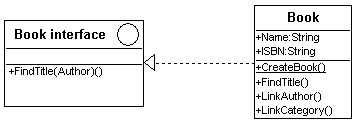
An interface represents the visible part of a class or package in a contractual client-supplier type relationship. The interface is a class stereotype.
An interface is a named set of operations that describe the behavior of an element. In particular, an interface represents the visible part of a class or package in a contractual client-supplier type relationship.
These are interfaces between the different components of the computer system.
Creating an Interface
To create an interface class in a class diagram:
1. In the toolbar, select Interface  .
.
. 2. Click in the diagram.
3. In the dialog box that appears, enter the name of the interface and click the Add button.
The interface class then appears in the diagram.
You can then specify the operations of the interface as for any other class.
Connecting an interface to a class
When you connect a class to an interface, you must specify if it is an interface required or provided by the class.
A required interface is an interface necessary for object operation.
A provided interface is an interface made available by an object to other objects.
To connect an interface to a class:
1. Click the Link button 
2. Create the link from the class to the interface.
A dialog box appears:
3. Indicate the type of link to be created: provided interface or required interface.
 Other types of links, specific to classes, can be displayed.
4. Click OK.