Attributes
Definition: Attribute
An attribute is a named property of a class. This is the most basic data saved in the enterprise information system.
Examples:
"Client Name" (attribute of the client class).
"Client No." (identifier of the client class).
"Account balance" (attribute of the account class).
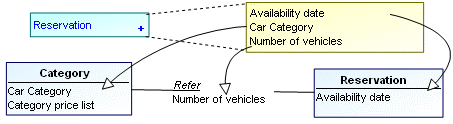
Classes and association classes may be characterized by attributes.
These attributes can be found by studying the content of messages circulating within the enterprise.
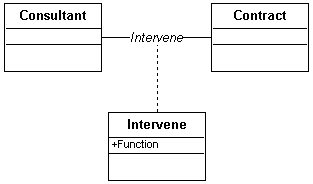
An attribute characterizes an association when its value depends on all the classes participating in this association.
In the diagram below, the "Role" that a "Consultant" plays in a "Contract" depends on the consultant and on the contract, and therefore on the "Intervene" association.
Specifying Class Attributes
Creating a standard attribute
To create an attribute on an class:
1. Select the class concerned and display its properties.
2. In the properties window, click the drop-down list then Components.
3. In the Attributes section, click Add Attribute .
The new attribute appears.
4. Click the name to modify it.
For each attribute, you can specify:
• Its Type, which can be expressed as an expression.
Example: Integer.
 The expression must comply with UML syntax. See Operation or Signal Signatures for further information.See also: Attribute type.
• Its Visibility:
• "Public": this is the default visibility. The attribute is visible to all.
• “Protected”: the attribute is visible to those inheriting its package, or to its friends.
• “Private”: the attribute is visible to its class or to its friends.
• Its Multiplicity, which is the number of times this attribute can be repeated in the class.
Creating a computed attribute
A computed attribute is connected to a calculation rule.
The calculation rule defines the input and output objects as well as the expression of the rule.
The input objects can be classes, types or data views. The output objects are classes only.
To create an attribute on an class:
1. Select the class concerned and display its properties.
2. In the properties window, click the drop-down list then Components.
3. In the Attributes section, click Add Computed Attribute calculated.
The new attribute appears.
4. Open the properties of the attribute to specify:
• the list of input parameters
• the description of the rule
Inherited attributes
When a generalization exists between a general class and a more specialized class, the specialized class inherits the attributes of the general class.
 Click the Inherited Attributes button to view attributes inherited from other classes.
 See also Definition: Attribute.
Attribute Properties
To open the Properties window of an attribute:
1. In the Components property page the holding class, in the Attributes section, select the attribute in question.
2. Click Properties.
The  button displays the hidden commands.
In the Characteristics page, you can specify:
• Whether it is a Static attribute: specifies if the attribute can take specific values for each instance of the class or take one value characterizing the entire class.
• "Yes": the attribute has a value that characterizes the entire class. The attribute "Telephone number length" for the "USA Client" class is 10 digits.
• "No": the attribute can take a different value for each class instance. For example, the "Telephone number" attribute has a different value for each instance of the "Client" class.
• If the attribute has Persistence, specifying whether its value needs to exist after the process or thread that created it, or whether it only lasts as long as the processing.
• Its Multiplicity, which is the number of times this attribute can be repeated in the class.
• Whether it is Read Only, that is if its value can be modified once it has been specified.
• Whether it is a Calculated Attribute, specifying if its value is determined from the value of one or more other attributes.
• The Initial Value of the attribute, assigned when an instance of the class is created.
Attribute type
A datatype defines the type of values that a data can have. This can be simple (whole, character, text, Boolean, date, for example) or more elaborate and composite.
Types are implemented as classes.
Any class can be used to type an attribute or parameter.
Example: Client, Order, Window, Table.
Classes of the “Primitive type” stereotype are created only for typing attributes or parameters. They are fixed.
Examples of primitive types:
String.
Integer.
Export address.
Monetary amount.
You can list the existing types or create new ones.
The types listed include the classes owned or used by the current package.For more information on the use of primitive types, see Attribute type.