Managing Report DataSets
Introduction to Report DataSets
Report DataSet
A Report DataSet is a set of data extracted from HOPEX repository.
This set of data is presented in a tabular form and defined by a Report DataSet Definition.
 To create a Report DataSet, Report DataSet definitions are available.
This set of data shown in a tabular form is used as a source of data in reports. Data can then be used and shown in different graphical formats.
Report DataSet Definition
A Report DataSet Definition describes how to build a Report DataSet from the HOPEX repository data.
For more details on Report DataSet Definitions, see Report DataSet Definition.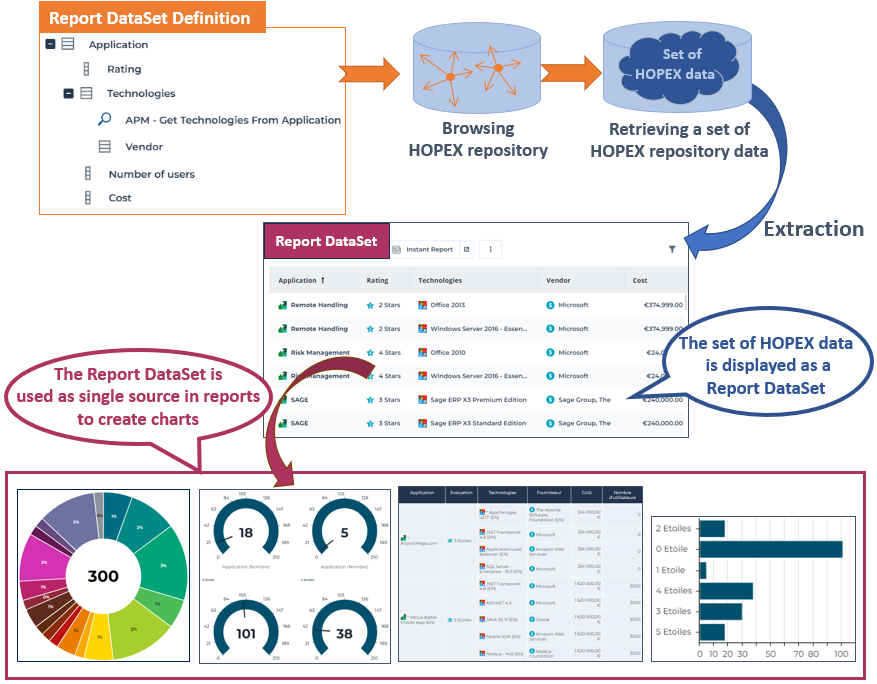
Accessing Report DataSets
Access to Report DataSets gets done the same way in all HOPEX Solutions.
Report DataSets are listed in two pages:
• public Report DataSets
• my Report DataSets
Each Report DataSet is listed with the following characteristics:
• its confidentiality (public/private)
• the Report DataSet Definition on which it is based
• the date and time it was last generated
• its generation time
• its owner container
To access a Report DataSet preview, see Accessing a Report DataSet properties.
To access Report DataSets:
1. In the navigation bar, select Environment > Common > Report DataSets.
If Environment is not displayed, click More  to access it.
Your Report DataSets are listed.
In this page, you can create a Report DataSet and access its properties.
See also Configuring and Using a Report DataSet.2. To access your Report DataSets, in My Report DataSets drop-down menu, select Public Report DataSets.
The public Report DataSets (including yours) are listed.
Accessing a Report DataSet properties
To access the properties of a Report DataSet:
1. Access Report DataSets.
2. In the Report DataSet list, access the Report DataSet needed.
To access the Report DataSet, you can use the list filtering tool, see Filtering a list data.3. Hover the mouse over the Name column and click:
• Properties  to display the properties in full page in the edit zone.
to display the properties in full page in the edit zone.• Open in new tab  to display the properties in a new tab and thus easily access the properties of the Report DataSet while performing other tasks in parallel.
to display the properties in a new tab and thus easily access the properties of the Report DataSet while performing other tasks in parallel.Properties of a Report DataSet
A Report DataSet is created from objects of the HOPEX repository.
In the Report DataSet properties, the Characteristics section specifies the characteristics of the Report DataSet:
• Report DataSet Definition is the definition on which the Report DataSet is based
• #Tags shows the tags of the Report DataSet
• Sharing defines the confidentiality mode of the Report DataSet:
• public: the Report DataSet is shared with the other users
• private: the Report DataSet is confidential to the user who created it.
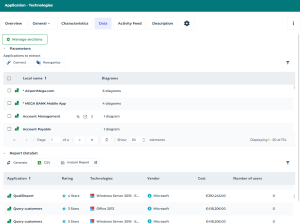
In the Report DataSet properties, the Data page includes the following sections:
• Parameters, which defines the objects to be extracted from the HOPEX repository.
• Report DataSet, which shows the Report DataSet data in a tabular form.
The data displayed is read-only.
For example, a Report DataSet with “Applications - Technologies” as a definition contains the following data for each application selected (objects to extract):
- "Application"
- "Rating"
- "Technologies"
- “Vendor” (of the technologies)
- "Cost"
- "Number of Users".
From the Data properties page, you can:
• perform the following operations:
This is only valid regarding the display: when you launch an instant report, the instant report is performed on all data. You can filter the data in the instant report, see Managing a Table Instant Report data (Report DataSet).• launch one or several instant reports in parallel