Actions on a List of Objects
In your HOPEX desktop, the objects in a list are useful entry points to perform actions on objects of the same type.
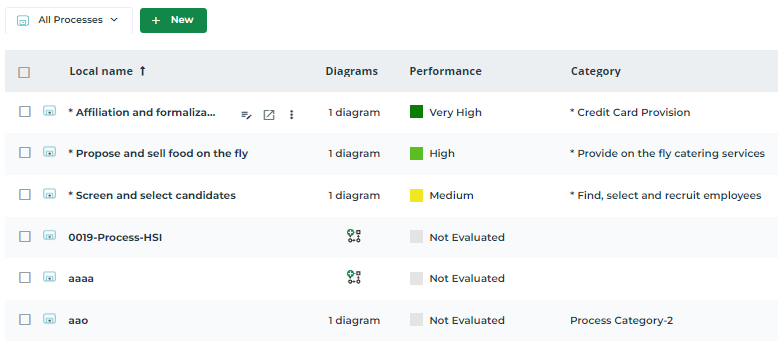
Using the menu bar of a list of objects, you can perform common actions.
Icon | Action on the list of objects | For more details, see: |
|---|---|---|
 | Create an object matching the object list | |
 | Display/Hide the filters on the columns |
Creating an object from a list
To create an object matching the object list:
1. In the list menu bar, click New .
.2. In the Local Name field, enter the name of your object.
3. (If needed) Enter the parameters.
4. Click OK.
Filtering a list data
In an object list you can filter data of one or several columns.
You can, for example, filter the objects of a list to display only the objects whose specific characteristic contains a string of characters with a specific character.
Operators available on a character string:
•  : to show values including the character string
: to show values including the character string•  : to show values that do not include the character string
: to show values that do not include the character string•  : to show empty values only
: to show empty values only•  : to show non empty values only
: to show non empty values onlyOperators available on a number or a date:
•  : to show values equal to
: to show values equal to•  : to show values greater than
: to show values greater than•  : to show values lower than
: to show values lower than•  : to show values between two values
: to show values between two values• : to show empty values only
: to show empty values only• : to show non empty values only
: to show non empty values onlyTo define a filter on a column:
1. In your HOPEX desktop, access the list of objects.
2. Click Display filters on the top right-hand side.
on the top right-hand side.Fields appear under the header of each column.
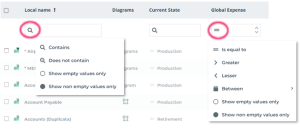
A default operator is displayed in the filtering field of each column.
3. (if needed) In the field of the column that you want to filter, click the operator and select another operator.
4. In the field of the column that you want to filter, depending on the case:
• enter a string of characters.
• select one of the proposed values.
• enter a number.
The list of objects is automatically filtered according to the filtering criterion defined for the column.
The title of the column that contains a filtering criterion is highlighted.
 You can add as many filters as columns.
For example, to the list of applications, you can filter applications whose:
- the corresponding expenses are above 3000€
- the Obsolescence Risk is “Very high”
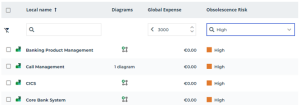 To remove the filter from a column, hover the cursor over the filter field and click
  .To remove the filtering from all columns, at the end of the filtering field row, click Delete All Filters
  .
.