Creating a Report DataSet
To create a Report DataSet you must:
• define the Report DataSet Definition on which you want to base your Report DataSet.
MEGA provides predefined Report DataSet Definitions for each product.
E.g.: Applications - Technologies.
• (if necessary) enter the Report DataSet parameters.
E.g.: the applications concerned.
 This consists in defining report input data.
 The parameters define the object groups and the way they interact in the report. They vary according to the Report DataSet Definition. A parameter value can group several objects.
To create a Report DataSet:
1. Access your Report DataSets.
2. Click New  .
.
.The Report DataSet creation window opens.
3. In the Report DataSet Definition field, use the drop-down list to select the Report DataSet definition on which you want to base your Report DataSet.
 Definitions are listed by name (and not by _GUIname).
E.g.: Applications - Technologies.
4. (Optional) Modify the Name of your Report DataSet.
By default its name is the _GUIname (or name) of its definition, then for the following ones: <_GUIname (or name) of its definition>-n.
The -n suffix takes on 1 at each following Report DataSet based on the same definition.
E.g.: Application Technologies -1.
5. (If needed) In the Parameters section, enter the required parameters.
For ex.: connect the applications to extract.
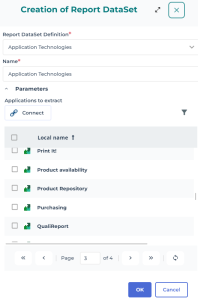
6. Click OK.
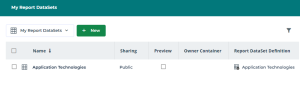
Your Report DataSet is created and fed by the selected data.
Your Report DataSet is accessible in the list of your Report DataSets (My Report DataSets).
 To configure and customize your Report DataSet, see Configuring and Using a Report DataSet.To launch an instant report from your Report DataSet, see Launching an instant report from a Report DataSet.