The Hopex IT Business Management Desktop
The menus available in Hopex IT Business Management depend on the profile with which you are connected.
ITBM Home Page
The ITBM solution home page consists of the following sections.
• The header presents some information of general interest.

These can be defined in the Administrator'
Administration>
Methodological Domain menu.
• My priorities: indicates the main strategic themes of interest to solution users.
• Help: points to user documentation and the user community.
• The
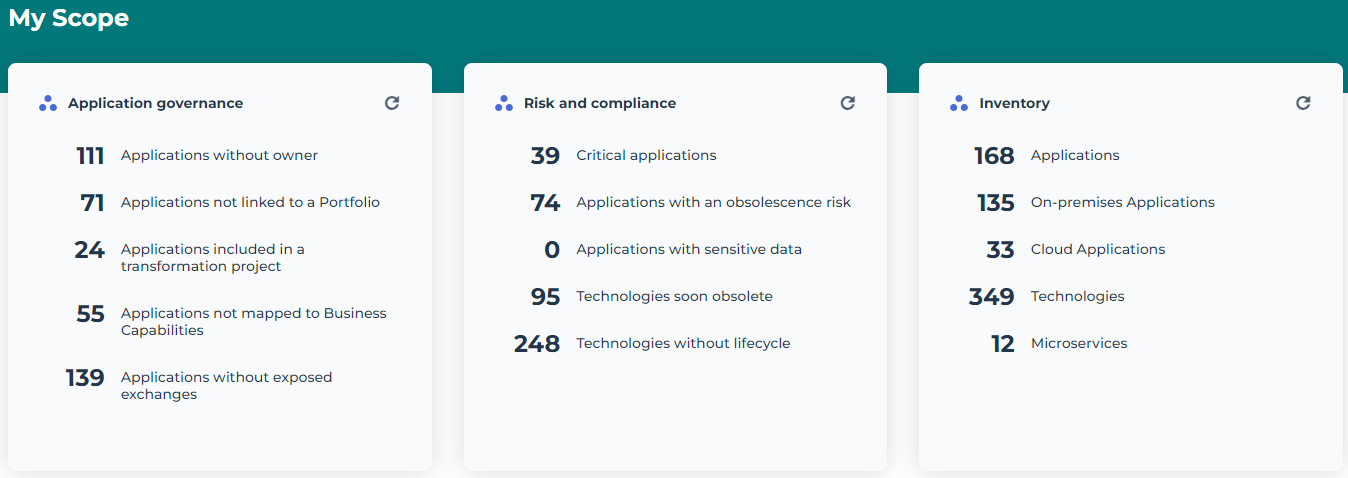
My Scope provides useful indicators of the repository content. See
Scope Indicators below.
• The Quick Access provides useful shortcuts:
• Recently viewed: last objects and diagrams accessed by the user
• Favorites: user favorites and shared favorites
• Actions: quick access to the creation of architecture elements.
• My favorite report: displays the user-defined or administrator-predefined report, which can be used as an entry point into the repository.
Scope Indicators
The My Scope section provides useful indicators on application assets. Clicking the indicator takes you to all the corresponding objects. There are three groups of indicators:
• Application governance
• Risk and compliance
• Inventory
Application governance
This tile lists the following objects:
• Applications without owners: displays a list of applications to which you can assign managers.
• Applications lot linked to a portfolio: displays a list of applications to which you can link portfolios.
• Applications without exposed exchanges: displays applications that neither receive nor send flows.
• Applications included in a transformation project: these are the applications that are part of the deliverables of a transformation project.
• Applications not mapped to business capabilities: displays a list of applications to which you can link business capabilities.
Risk and compliance
This tile lists the following objects:
• Critical applications: all applications that cover a strategic business capability, in other words, whose Business Value is "Significant”.
• Applications with an obsolescence risk: applications whose risk of obsolescence is between “Medium” and “Very high”.
The risk of application obsolescence corresponds to the highest risk of the technologies linked to it. See the obsolescence risk in the
Overview of a technology.
• Applications with sensitive data: applications linked to data stores containing data (classes, MD entities, data views) or Concepts in the "Sensitive data" category.
• Technologies soon obsolete
• Technologies without lifecycle
Inventory
The Inventory tile displays the number of following objects:
• Applications
• On-premises Applications
• Cloud Applications
• Technologies
• Microservices
Enterprise Architect Desktop
The Hopex IT Business Management navigation menus are:
Business function
The Business menu is dedicated to strategic transformation.
Applications
The Applications menu shows all the applications in the repository, as well as the application portfolios.
Technologies
The Technologies menu lets you manage application-related technologies.
Data
The Data menu allows you to make an inventory of the conceptual and logical data exchanged within the application assets.
Tools
The Tools menu gives access to the following submenus:
• SMART Analysis to analyze the business value of portfolio applications and their migration to the Cloud.
• IT-Pedia to import and standardize technologies in HOPEX.
• AI-Driven APM, to distinguish technologies from business applications.
• Assessment and data call.
Reports
The Reports menu provides a search tool for all report templates and saved reports.
Projects
The Projects menu is dedicated to transformation project management.
Inventories
The Inventories menu gives access to the following subjects, divided into several themes.
• Business Architecture theme, giving access to the following elements:
• business architecture environment

A business architecture environment represents the relationships of a business functional area with its partners.
• Business Functions
A business function is a conceptual unit of the division of responsibilities in an enterprise. It is used to structure the management of information processing, energy, and equipment produced or used. Business functions define the skills and the functionalities necessary to the enterprise to fulfill its mission.
• Business Partners
A business partner designates a third-party who is in relation with the enterprise within the framework of a given business architecture environment. Examples: private sector client, regulatory organization, supplier.
• Capabilities theme, giving access to the following elements:
• Functionalities
• Technology Capabilities
• Hardware capabilities
• Software theme, giving access to the following elements:
• IT Services
An IT service is a software component of an application, that can't be deployed alone and that realizes a sub-set of the functionalities of this application either for end users of this application or inside the application (or another application). This includes batch programs.
• Microservices
A microservice is a software component that can be deployed autonomously, but which does not directly provide an end user service. It can interact with other application services, applications or application systems. This is a deployable software component that uses software technologies. For example: an authentication service, a PDF file printing service.
• System process
A system process is the executable representation of a process. the events of the workflow, the tasks to be carried out during the processing, the algorithmic elements used to specify the way in which the tasks follow each other, the information flows exchanged with the participants.
• Application Hierarchy, to view applications associated with the following object types: business line, process category, business capability, etc.
• Logical software architecture, to describe the elements contained in the information system logical architecture.
• Technologies theme, giving access to the following elements:
• Technologies Hierarchy, to view technologies associated with the following object types: technology capability, technology type, vendor, etc.
• Technology Stacks, which are groups of technologies.
• Installations theme, to describe application deployment elements.
A facility is a model of site of interest for the enterprise. Examples: Data Center, Factory or Outlet
• Services Catalogs theme, giving access to the following elements:
• Cloud services
• Technical Services, to list the technical services covered by applications.
• Business Services, to list the business services covered by applications.
• Hardware Service Catalogs
• Infrastructure theme, giving access to the following themes:
• IT Infrastructure
• Resource Architecture
• Resource Configuration
Governance
In the Governance menu you can define the regulations to which application architecture objects are subject.
In the properties of an application, the
Governance page defines the regulations to which application is subject. By default, this page is hidden, you can display it using the
Show/Hide button of the application properties.
Environment
The Environment menu gives access to the following submenus:
• Containers, to access the features of library and environment management.
• Organization, to access the main objects processed with the Hopex IT Business Management solution.
• Business lines
A business line is a high level classification of main enterprise activities. It corresponds for example to major product segments or to distribution channels. It enables classification of enterprise processes, organizational units or applications that serve a specific product and/or specific market.
• Process categories
A process category defines a group of processes. It is linked to a Process Map or higher level Process Category. It regroups several processes and/or other categorized elements (e.g. Value Streams, Applications). It serves as an intermediate categorization level in the process hierarchy, so as to provide a guided and progressive access to finer grained processes.
• Processes
A process is a set of operations performed by org-units within a company or organization, to produce a result. It is depicted as a sequence of operations, controlled by events and conditions. In the BPMN notation, the process represents a sub-process from the organizational point of view.
• Sites
A site is a geographical location of an enterprise. Examples: Boston subsidiary, Seattle plant, and more generally the headquarters, subsidiaries, plants, warehouses, etc.
• Org-Units
An org-unit represents a person or a group of persons that intervenes in the enterprise business processes or information system. An org-unit can be internal or external to the enterprise. An internal org-unit is an organizational element of enterprise structure such as a management, department, or job function. It is defined at a level depending on the degree of detail to be provided on the organization (see org-unit type). Example: financial management, sales management, marketing department, account manager. An external org-unit is an external entity that exchanges flows with the enterprise. Example: customer, supplier, government office.
• Report DataSets
A Report DataSet is a set of data extracted from the HOPEX repository and used as a data source in reports.
For more information, see Platform - Common Features > Documentation > Generating Documentation > Managing Report DataSets.
• All Sketches, to access all the skectches of your repository.
A sketching diagram is a drawing that enables you to exchange with your coworkers without an issue of methodology or formalism.
• Tags
A tag is a classifying description used to characterize objects.
For more details on the use of tags, see Platform - Common Features > Collaboration Tools > Communicating in HOPEX.