Using Cloud Services
 The Cloud Service (considered as an IoT device) can be used in a deployment architecture. The Cloud service picture appears in the frame of the corresponding deployable package.
 You can import Cloud Services Catalogs into your Hopex repository, such as: Amazon (AWS), Microsoft (Azure) and Google (GCS). The imported files contain the name and the pictures of the Cloud Services proposed by the vendor.
 The Cloud Services are provided by your administrator using the module import features. For more details, see Modules > Importing a Module documentation.
Accessing the list of Cloud Services
To access the list of elements concerning the Cloud services:
1. From the Inventories navigation menu, select Cloud Service Catalogs.
2. Unfold the Vendor Catalog folder in the Browse area.
3. Expand the folder of a vendor catalog.
The following folders provide access to different elements:
• Service Cloud : provides access to the Cloud services of the catalog.
• Technology capability map: consolidates the set of technology capability maps covered by the Cloud services of the catalog.
For more details on functionalities, see Describing functionalities with Hopex IT Architecture.• Legacy Publishing Vendor: with Hopex, a vendor is represented by an org-unit.
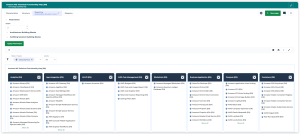
To view the functional coverage of the Cloud services connected to the technology capability map:
1. Select the technical functionality map of the catalog that interests you.
2. Open the Reporting > Building Block Breakdown Report property page.
Cloud Service properties
The Characteristics property page of a Cloud service provides access to:
• its Name,
• the Service Type,
• the Description text,
• The Fulfillments section that provides access to the technology capabilities covered by the Cloud Service
For more details on a component fulfillment, see Describing the fulfillment of a Functionality.• the Using Application Deployment Architecture section that provides a tree of all the application architectures using the Cloud service through a deployable application package component.
For more details on the use of Cloud services by a deployable application package, see Describing a Deployable Application Package.