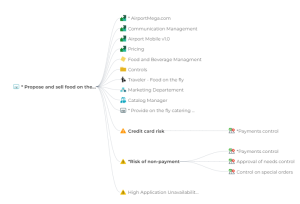
Process Impact Graph
This report is a dendrogram. It displays the link between process and different object types.
 See Handling a Dendrogram for further information.
 Path
Property page of the process > Reporting > Process Description > Process Impact Graph.
Object types
|
Object type
|
For further information
|
|---|---|
|
Value chain
|
|
|
Business capability
|
|
|
Process category
|
|
|
Customer journey
|
|
|
Project
|
|
|
Risk
|
See Creating a risk.
|
|
Concept
|
|
|
Application
|
|
|
Participant
|
Prerequisites to linking a project to a process
You need to use HOPEX Project Portfolio Management.
To display the link between a process and a project:
 Fill the process in the section Project Deliverables. For further details, see Project deliverables.
Prerequisites to linking a concept to a process
You need to use HOPEX Information Architecture.
To display the link between a process and a concept:
1. In the diagram toolbar, click Data Object.
2. In the Creation of Data Object window, select a Content.
3. Access the property page of the content and expand the Business Information Used section.
4. Click New.
In the Add Concept window, select an existing concept or create a new one.
Result