1. Foreword
The modular approach of HOPEX V5 and especially its HOPEX Application Server Customization module enable to improve HOPEX customization process:
• extracting/selecting customization performed in the SystemDB
• pushing the customization to production
You can download the modules from the HOPEX Store: https://store.mega.com/modules/details/has.custom
1.1. Vocabulary
1.1.1. Definitions
|
Terms
|
Definition
|
|
Platform
|
Is the reference to a server that represents a step in the process of delivery. There are often: DEV, STAGE, PROD as platform
|
|
Mode
|
Includes the following values:
• Development (DEV)
• Staging (STAGE)
• Training
• Production (PROD)
|
|
Instance
|
Represents an installation on a given port containing only one environment.
Customer have often one instance by platform.
An instance has a given mode such as DEV, STAGE, PROD.
|
|
Environment
|
Is the definition of the repositories contained in one HAS instance.
This environment is composed of at least:
• the SystemDB repository
• one data repository
|
|
Repository
|
Represents a database that physically store the content: either technical data or functional data.
|
1.1.2. Synonym
|
Main Term
|
Synonym or alternative name
|
|
STAGE
|
STAGING, PRE-PROD, UAT, TESTING, INTEGRATION
|
1.2. From DEV to PROD process
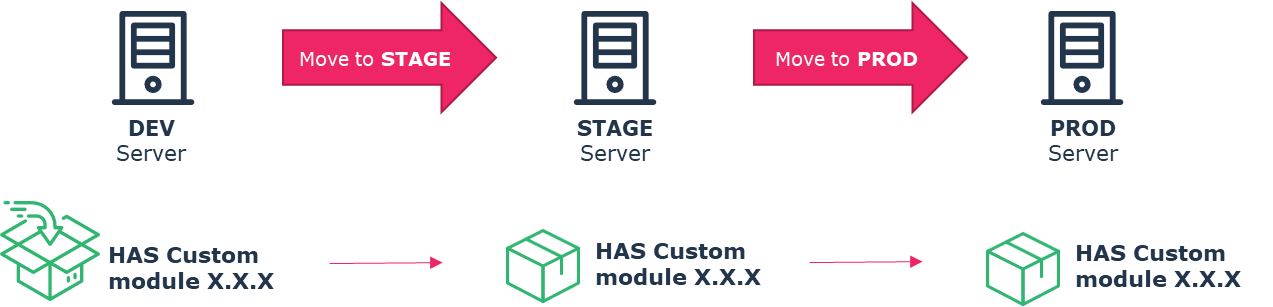
When customizing, you must follow these rules:
• You have a DEV platform and instance where you can perform your customization.
• You have a STAGE instance where you can test the package containing all your customization.
• You have a PROD instance where you “ship” a fully tested customization package.
HOPEX is a highly customizable platform: data structure, business logic, UX behavior.
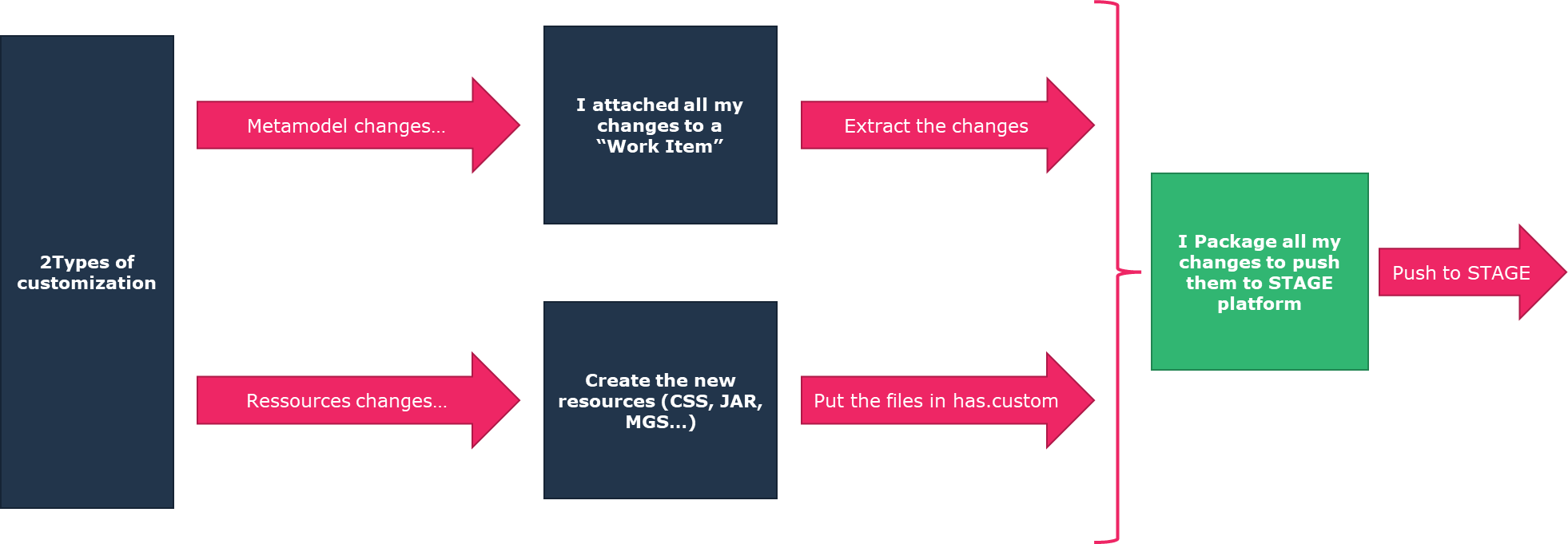
Each customization, at each level, can involve changes in:
• data
o in the SystemDB, or
o in the data repository
This data is stored in the database and need to be extracted to be imported in the production platform.
• files
o static resources files (CSS, JS, PNG…)
o source/compiled code (JAR, DLL…)
These files need to be stored in the right folders.
The process described here explains how to:
1. Create your customization in the SystemDb.
2. Extract the customization out of the SystemDb.
3. Package all the files (resource files and MGR) in the right location.
4. Push everything to production
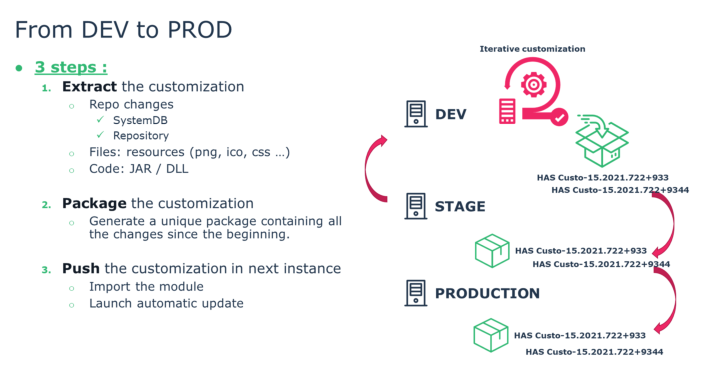
Once the package is created from the DEV instance, this package is used in STAGE (also called UAT / TESTING / PRE-PROD) and at the end in production “as is” without any changes. This allows you to confirm that, what was customized is valid and not altered in the move to PROD process.
The process is iterative: it allows you to perform it many times and keep track of the iteration.
1.3. The big picture
This document includes the following chapters:
|
Chapter
|
Content
|
|
Introduction to customization
Full customization capability is out of scope for this document.
|
|
|
Mandatory steps prior to customization
|
|
|
SystemDb repository customization following best practices
|
|
|
Extraction process of valid customization
|
|
|
Storing your resources in the appropriate location
|
|
|
Packaging all your resources (e.g.: MGR, CSS, JAR)
|
|
|
Understanding the process of pushing your customization in stage and production
|