HOPEX Desktops
HOPEX desktops include:
• a toolbar common to all HOPEX desktops
• a navigation bar common to all HOPEX desktops
• an edit area
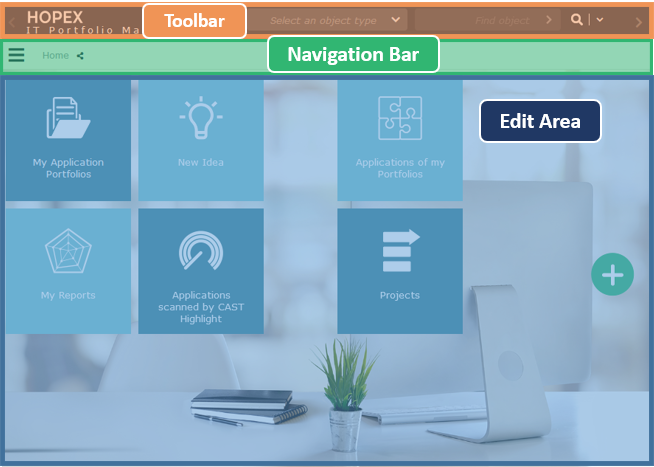
Toolbar
The toolbar is common to all HOPEX desktops and available in all pages of the HOPEX desktops.

The toolbar contains:
Toolbar content | |
|---|---|
 | Switch the search bar Changes the type of quick search. |
 | Undo/Redo Cancels or redoes the last action(s) performed. |
 | Refresh Instantly updates all the open windows in your desktop when you modify the name or value of an object attribute (trees, lists, property pages, diagrams) |
 | Autosaved (specific to a public workspace) its tooltip indicates the date and time your desktop was last saved.  see Working in HOPEX see Working in HOPEX |
 | Recently viewed Access to your recently viewed objects |
 | Notifications Quick access to your notifications – the red dot indicates that you have unread notifications See Notifications. |
 | Main menu Access your connection information and main actions See Main menu |
 | Help Quick access to HOPEX online documentation This (user and technical) documentation includes a search tool |
 | Logout to disconnect from HOPEX. |
You can also access useful actions and information such as:
•  the name of the Solution used. It enables to return to the home page.
the name of the Solution used. It enables to return to the home page.See Home Page•  the quick search bar to carry out full-text searches or searches by object type in the entire HOPEX repository. It also enables to define in which window you want to display your search results, according to your needs.
the quick search bar to carry out full-text searches or searches by object type in the entire HOPEX repository. It also enables to define in which window you want to display your search results, according to your needs.See Quick Search.•  time elapsed since last connection: its tooltip displays the exact date/time.
time elapsed since last connection: its tooltip displays the exact date/time.Navigation bar
The navigation bar is common to all HOPEX desktops and available in all pages of the HOPEX desktops.

The navigation bar contains:
•  a navigation menu to access the navigation panes.
a navigation menu to access the navigation panes.•  a breadcrumb to go back to a previously displayed page.
a breadcrumb to go back to a previously displayed page.See Breadcrumb.• (With a diagram in edit mode)  Properties, associated with the diagram, to display the properties of the described object or the objects included in the diagram.
Properties, associated with the diagram, to display the properties of the described object or the objects included in the diagram.•  Review Note, associated with the edit area, to view or add review notes.
Review Note, associated with the edit area, to view or add review notes.See Review Notes.•  enabled button
enabled button• disabled button
disabled buttonEdit Area
The edit area is used to perform business and technical operations proposed by the selected Solution.
In the edit area, you can display, for example, trees, list of objects, or tiles, which give access to properties of objects, their diagrams, analysis reports.
 Trees enable to drag and drop objects from a tree into a diagram.
 On first connection to HOPEX, the edit area displays the home page.
See Home Page.