Undoing or Redoing Actions on Objects
The undo mechanism in a diagram or in the navigator allows you to cancel the last action carried out. Having canceled an action you can subsequently change your mind and redo it.
This is true:
• for purely graphical operations,
• for operations involving actions on the repository (creating or deleting objects for example).
Having created an object in a diagram, if you decide to undo this creation action, the object will be deleted from both the diagram and the repository. The same applies when you redo an action that you canceled.
Undoing/Redoing an action
To cancel the last action carried out in a diagram or in the navigator:
 In the desktop toolbar, click Undo
  .
.To redo an action you canceled in a diagram or in the navigator:
In the desktop toolbar, click Redo  .
.Undoing/Redoing several actions
You can undo or redo the last actions performed in your workspace. You can only undo actions chronologically.
E.g.: object creation or deletion, modification of object properties.
To undo one or more actions:
1. In the desktop toolbar, click the drop-down list of the Undo button.
.The list of the latest actions is displayed (the most recent first).
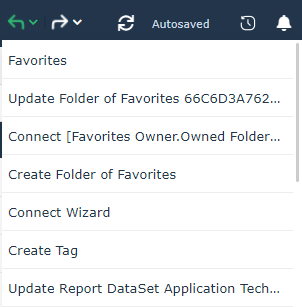
2. Place the mouse on the last action that you want to undo.
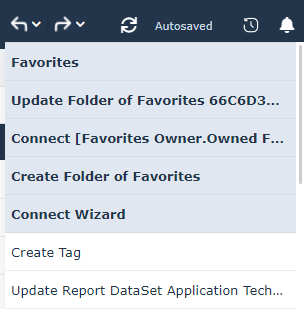
3. Click to undo the actions.
 To undo only the last action carried out, simply click Undo.
To reset one or more canceled actions:
Proceed in the same way as before, having clicked the drop-down list arrow of the Redo button .To redo only the last action carried out, click Redo.