Connection to HOPEX Explorer
HOPEX Explorer Connection Profiles
The HOPEX Explorer desktop is a simplified desktop that facilitates navigation. You access it in browse mode in a work environment adapted to you.
A profile and its associated lite profile have access to the same objects with the same rights.
HOPEX Explorer connection profile types
Two types of profiles provide access to the HOPEX Explorer desktop:
• Browse type profiles
Browse type profiles are used to browse in HOPEX Explorer and perform customization and collaboration actions that do not modify the objects of the HOPEX repository.
In the properties pages of a browse type profile, its Command Line attribute contains /HV.
Example: Application Viewer Lite.
• Contribution type profiles
Contribution type profiles are used to navigate in HOPEX Explorer, perform customization actions without impacting the HOPEX repository, and perform modification actions that can modify the HOPEX repository objects.
 See Functionalities Available to All Profiles and Additional Functionalities Available to Contribution Type Profiles.
In the properties pages of a contribution type profile, its Command Line contains /HC.
Example: Application owner lite.
Example of a browse type profile
The Application Viewer Lite profile is a browse type profile that provides access to:
• the HOPEX Explorer desktop in a work environment adapted to the Application Viewer profile.
• the same objects and the same functionalities as the Application Viewer profile.
Example of a contribution type profile
The Application Owner Lite profile is a contribution type profile that provides access to:
• the HOPEX Explorer desktop in a work environment adapted to the Application Owner profile.
• the same objects and the same functionalities as the Application Owner profile.
Accessing HOPEX Explorer
To connect to HOPEX Explorer:
1. Connect to HOPEX (Web Front-End) with one of the HOPEX Explorer connection profiles.
See Accessing HOPEX.The home page of the HOPEX Explorer desktop appears and a session opens in browse mode.
After a certain period of inactivity, you are disconnected from HOPEX Explorer. To reconnect, repeat the steps of the procedure above. This inactivity period is configured by the portal administrator.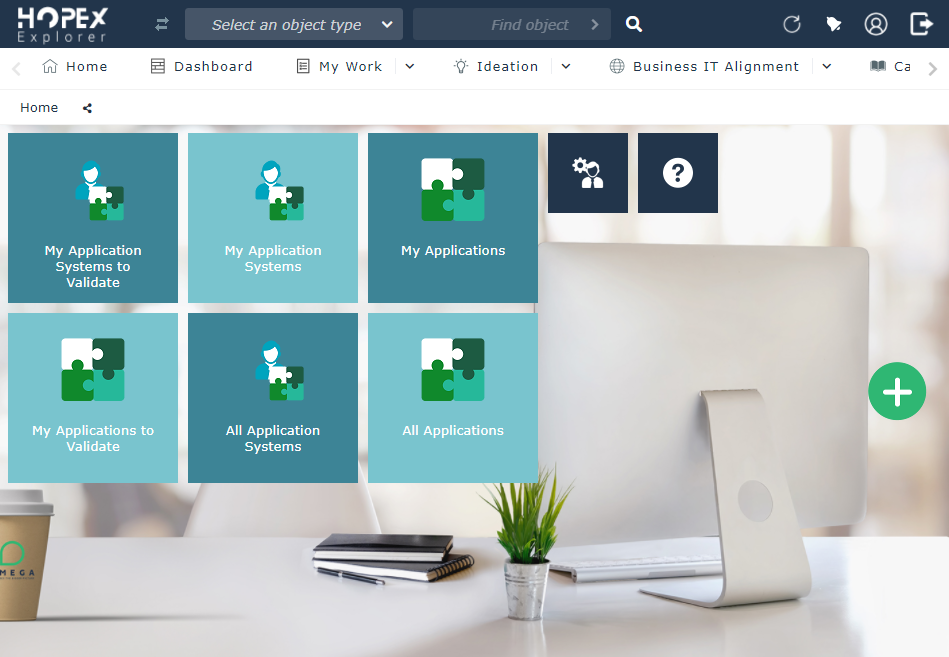
The layout of the HOPEX Explorer desktop adapts to its support (PC or tablet).
The home page and the HOPEX Explorer menus are specific to the profile you used for connection.