Managing the Object Follow-up
You can receive a notification and/or an email when an object is modified. To do this, you must follow the object.
 To view the activity on the objects that you are following:Accessing the activity on the objects that you are following see
You can follow:
• all objects to which you have access in HOPEX
See Following an object.• all objects for which you participate in a review note
Following an object
You can stop following an object at any time.To follow the modifications to an object:
1. From your HOPEX desktop, access a list of objects.
2. Select the object that you want to follow and click Follow  .
.
.Alternatively, in the Social tab of the object concerned, in the Followers section, click Follow .In the Collaboration window, Social tab, Followers section, your name is added to this object follower list.
When modifications are made to the object:
• you are notified by email
• in the main toolbar of your HOPEX desktop, a red dot indicates that you have unread notifications  .
.
. If you are working in a:
• public workspace, you receive the notification as soon as it is issued.
• private or collaborative workspace, you receive the notification after refreshing your workspace.
Accessing the list of objects you are following
To access the list of objects you are following:
1. From your HOPEX desktop, click the navigation menu  and select Collaboration.
and select Collaboration.The collaboration features appear in the form of tiles in the Browse  edit area.
edit area.2. Click the My social objects tile.
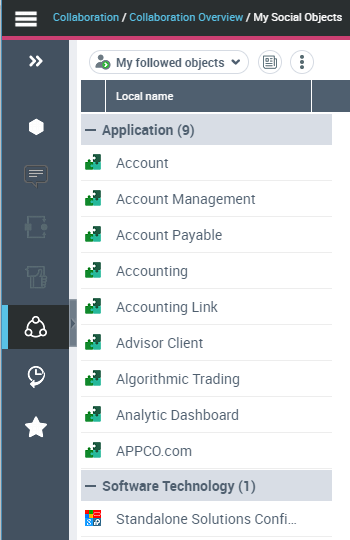
The page showing the list of objects you like or the list of objects you follow is displayed.
3. In the drop-down menu, select My followed objects.
The object you are following are listed by type.
You can perform actions on these objects.