Presentation of the IRM Contributor Desktop
Accessing the IRM Contributor Desktop
To access the IRM Contributor Desktop:
1. See Accessing HOPEX Explorer.
2. Login with the "IRM Contributor" profile.
Object Types by Solutions Used
Find below the object types and features available depending on the solution used.
|
Features/Solutions
|
ERM
|
IC
|
LDC
|
Audit
|
|---|---|---|---|---|
|
Generalities
- Viewing the environment (Viewing your Environment)
- Viewing and exporting dashboard reports
- Full-text search
|
X
|
X
|
X
|
X
|
|
Risks
- Identifying risks
- Answering assessment questionnaires
(See: Answering a Questionnaire)
|
X
|
|
|
|
|
Controls
- Creating Controls
- Answering assessment questionnaires
(See: Answering a Questionnaire)
|
X
|
X
|
|
|
|
Control Execution
- Completing Execution Check-Lists
|
|
X
|
|
|
|
Action Plans /Actions
- Viewing and following-up action plans
- Creating actions
|
X
|
X
|
X
|
|
|
Recommendations
- Viewing recommendations
(See Managing Recommendations).
|
|
|
|
X
|
|
Incidents
- Declaring incidents
(See Managing Incidents).
|
|
|
X
|
|
Home Page
For a general description of an Explorer desktop, see Description of the HOPEX Explorer Desktop.
The HOPEX Explorer home page provides tiles that you can use to perform the most common tasks on the objects that you work with.
 The tiles and menus displayed depend on the solution(s) used.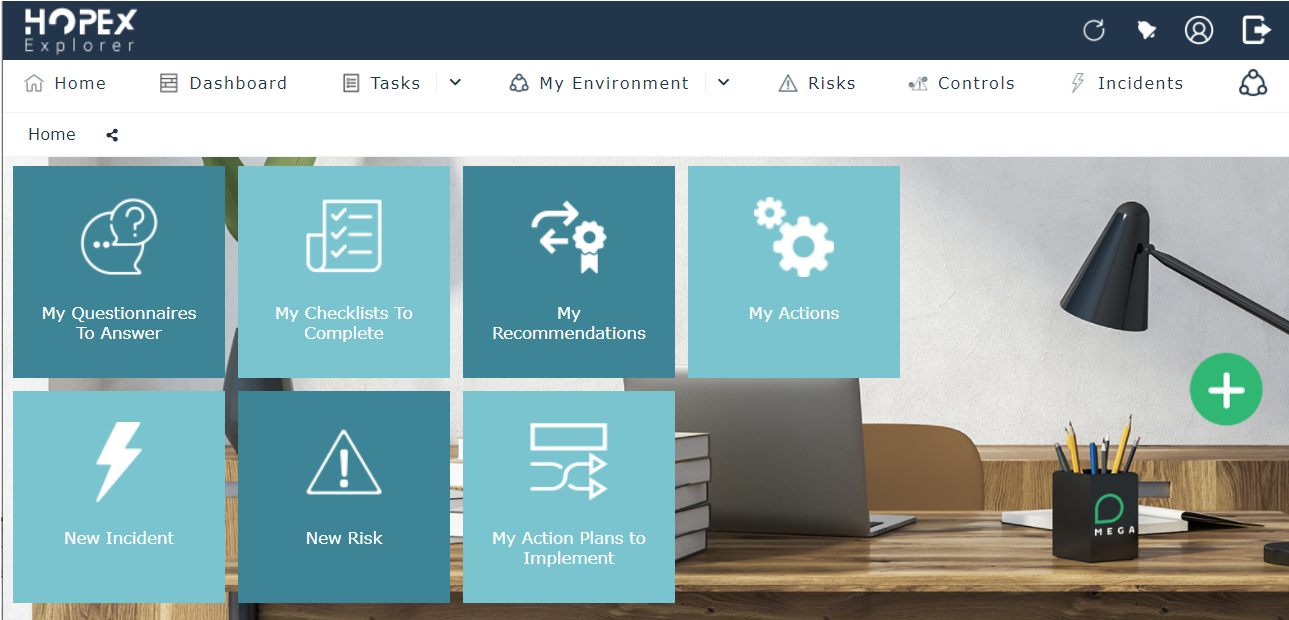
You can, for example, answer questionnaires or enter a progress percentage for your action plans.
Dashboard
You can add widgets adapted to various IRM issues.
See:
Tasks
From here you can access objects of interest and on which you may have to perform an action.
See:
My Environment
In this section you find the objects which can populate the scope of the objects you work with.
• Business processes
• Organizational processes
• Applications
• Business lines
• Entities
• Requirements: all the requirements constraining the elements for which you are responsible
For more details, see Viewing your Environment.
Risks
 A risk is a hazard of greater or lesser probability to which an organization is exposed.
This menu enables you to access:
• Your risks: the risks you own
• Risks within your scope: risks for which you are an assessor in the context of at least one of the objects of your scope
For more details on the characteristics of risks, see Describing Risks.
Controls
This menu lists all the controls for which you are responsible (for at least one of the entity in your scope).
Un contrôle est un moyen de maîtrise d'un ou plusieurs risques permettant de s'assurer qu'une exigence légale, réglementaire, stratégique ou interne à l'entreprise est respectée.For more details, see Control Characteristics.
Incidents
This menu lists the incidents:
• you declared
• within your scope: incidents related to at least one object in your scope
An incident is an event occurrence, internal or external, that has an impact on the organization. It is the basic element for collection of data concerning operational risk.For more details, see Managing Incidents.