Creating Repository Snapshots
 You can create a repository snapshot for RDBMS format repositories.
You can create repository snapshots from:
• Administration applications (Windows Front-End and Web Front-End)
• HOPEX (Windows Front-End)
The "Authorize management of repository snapshots in the workspace" option must be selected (Options > Collaborative Environment)
The "Authorize management of repository snapshots in the workspace" option must be selected (Options > Collaborative Environment)
Creating a repository snapshot from the Administration application
Windows Front-End
To create a repository snapshot from HOPEX Administration:
1. Launch HOPEX Administration application ("Administration.exe").
2. Connect to the environment with a user that has an Administrator profile.
3. Expand the Repositories folder.
4. Expand the repository folder concerned (RDBMS format).
5. Right-click the Repository Snapshots folder and select Manage.
6. In the repository snapshots management window, click New  .
.
.A creation wizard appears.
7. Select the criterion to be used to find the state of the repository to be captured:
• Design tasks
• Dispatches
8. Click Next.
9. In the Local Name field, enter the repository snapshot name.
10. Select the task/dispatch
11. Click Finish.
You obtain a list of snapshots, irrespective of the criterion selected for snapshot creation (design task or dispatch).
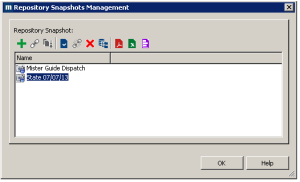 In all cases, repository states correspond to the moment data is dispatched.In the snapshot management dialog box, you can delete snapshots or view their properties.
Web Front-End
To create a repository snapshot from the HOPEX Administration desktop:
1. Connect to the HOPEX Administration desktop.
2. Click Repository Management> Snapshot Management > Snapshots.
3. In the edit area, in the Snapshots tab, click New .
.A creation wizard appears.
4. Select the criterion to be used to find the state of the repository to be captured:
• design tasks
• Dispatches
5. Click Next.
6. In the Local Name field, enter the repository snapshot name.
7. Select the task/dispatch
8. Click Finish.
Creating a repository snapshot from HOPEX
To create a repository snapshot, the "Authorize management of repository snapshots in the workspace" option must have been selected (Options > Collaborative Environment) It is recommended that this option be selected at profile level.To create a repository snapshot from HOPEX:
1. Connect to HOPEX.
2. In the HOPEX menu bar, select Tools > Manage > Manage Snapshots.
In the dialog box that appears, you can create and delete repository snapshots as explained in the procedure Creating a repository snapshot from the Administration application.