Connecting to an Environment
To connect to an environment:
1. Connect to HOPEX Administration.
2. Expand the Environments folder.
The list of referenced environments appears.
 The asterisk that may appear after the environment name means that you must compile the metamodel and/or the technical data, see "Compiling an Environment", page 195.
3. Right-click the environment you want to connect to and select Open.
The environment connection dialog box appears.
Administrator and Mega users own administration rights. The Administrator user identifier is System. The Mega user identifier is Mega.5. (optional) Type the user Password.
By default, Administrator and Mega users do not have a password.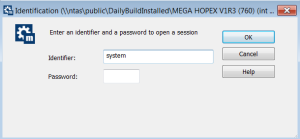
6. Click OK.
The content of the environment folder is available.

This environment folder contains the folders:
• Repositories containing repositories referenced in the environment
• Customized Shapes containing HOPEX shapes customized by the user. They are stored in the Mega_Usr folder of the environment.
• User Management to manage:
• the users
• the Assignment of profiles of each user
• the profiles
• the UI Access
• the LDAP Servers.