Accessing HOPEX Windows Front-End
You can start HOPEX from your workstation:
• directly with HOPEX installed on your machine.
• via a server or another machine to which you can connect.
To start HOPEX:
1. Double-click the HOPEX icon  .
.
.The connexion dialog box appears.

2. In the Environment field, select your environment.
 If you can access only one environment, this is automatically taken into account and the environment selection field is grayed.For more details on environments and users, see the chapters Managing Environments and Managing Users in HOPEX Administration - Supervisor.
3. In the Identifier field, enter your identifier.
4. In the Password field, enter your password if necessary.
5. Click OK.
When you have been authenticated, the workspace selection dialog box appears.
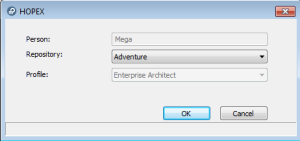
The Person field is defined automatically; it indicates the name of the person associated with the identifier defined in the connection dialog box.
6. In the Repository field, select your work repository.
The drop-down menu  opens the list of repositories available in the environment. Before you begin modeling the data of your company, it is recommended that you create a new repository in a new environment.If you can access only one repository, this is automatically taken into account.
7. In the Profile field, click the arrow and select the profile with which you want to work.
If you can access only one profile, this is automatically taken into account.8. Click OK.
Your desktop appears.