Introduction to Business Roles and Profiles
See:
Business role
A business role defines the function of a person or person group in the enterprise (example: Risk Manager, Enterprise Architect).
Assignment of a business role is defined at repository level. Assignment of a business role to a person can therefore be different in each repository of the environment.
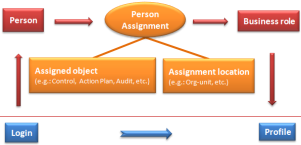
Business role and connection:
To each person or person group, you must assign a business role so that this person or person group can connect to a MEGA application. By default, no business role is assigned to a person or person group.
Only a business role connected to a profile enables connection. Each business role serving for connection is associated with only one profile.

Several business roles can be connected to the same profile.
Business role and object assignment:
An object assignment business role is used to assign a task to a person (example: an audit mission, action plan) and where appropriate for a specific location (example: Paris agency).
Profile
A profile defines access rights to repositories, to user interfaces, and to data.
A user must have at least one profile to be able to connect to a MEGA application.
When the Management of assignment of business roles to persons option is:
• selected (default mode), the profile is connected to the business role, which is assigned to the person.
• cleared, the user profile is directly defined on the login of the person.
By default, no profile is connected to the login of a user.
A user of administrator type must always be directly connected to the Administrator profile to be able to connect to the Administration application.
Profile - Business role
Business roles are assigned to persons or person groups. The assignment manages the link between person or person group and business role.
By default, the Management of assignment of business roles to persons option is selected. This option is necessary for working with MEGA Solutions such as risk management and audit.
Depending on business solutions implemented, localization of assignments may not be used, and the same assignments will be shared by all environment repositories. In this case, there is no need for this option and you can clear it. Profiles are then managed by direct link of profiles on login of the person or person group.
The connection schema of a user to a MEGA application varies according to selection or not of the Management of assignment of business roles to persons (environment option):
Assignment of business roles to persons mode
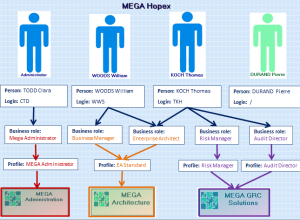
The Management of assignment of business roles to persons option is selected (default mode). In this case, you must assign a business role to the person. To connect to MEGA:
• the person must have a login
• the person must have at least one business role
• this business role must be connected to a profile
The profile is connected to the business role that is connected to the person by assignments.
In the above example:
• Clara TODD has a login connected to the MEGA Administrator business role (connected to MEGA Administrator profile):
she can connect only to Administration applications (Windows Front-End and Web-Front-End).
• William WOODS has a login connected to Business User and Enterprise Architect business roles (connected to EA Standard profile):
he can connect only to the MEGA Architecture: application.
• Thomas KOCH has a login connected to business roles Enterprise Architect (connected to EA Standard profile), Risk Manager (connected to ERM Risk Manager profile) and Audit Director (connected to Audit Director profile):
he can connect to applications MEGA Architecture: and MEGA GRC Solutions.
• Pierre DURAND does not have a login:
he cannot connect to MEGA.
Definition of profiles to persons mode
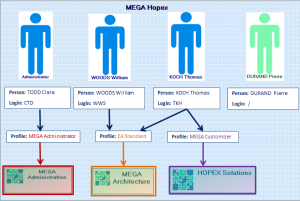
When the Management of assignment of business roles to persons option is cleared, profiles are directly managed on the login of the person. To connect to MEGA:
• the person must have a login
• the login of the person must be connected to at least one profile.
In the above example:
• Clara TODD has a login connected to the MEGA Administrator profile:
she can connect only to Administration applications (Windows Front-End and Web-Front-End).
• William WOODS has a login connected to EA Standard profile:
he can connect only to the MEGA Architecture: application.
• Thomas KOCH has a login connected to EA Standard and MEGA Customizer profiles:
he can connect to MEGA Architecture: and HOPEX Solutions applications.
• Pierre DURAND does not have a login:
he cannot connect to MEGA.