Consulting Object Properties
Accessing object properties
To access the state properties:
1. Select an object, for example in a navigation tree, query results window or diagram.
2. Right-click the object and select Properties.
The properties window appears.
General object properties
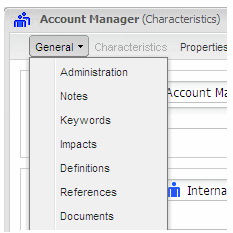
The General tab of object property dialog boxes has several sub-tabs, each corresponding to a property type.
 MEGA
MEGA objects present different properties. For more information, see the user corresponding to the solution.
Administration Sub-tab
This subtab groups information that is useful for repository administration, for example:
• Object type
• Object creation date
• Object modification date
Notes Sub-tab
You can use this subtab to create, connect or delete notes. Notes can be connected to all object types and can be placed in diagrams to draw attention to particular points.
Keyword Sub-tab
This subtab allows you to assign keywords to all the objects. The buttons in this tab also allow you to create new keywords.
Before creating a keyword, it is recommended that existing nomenclature be checked to ensure that it does not already contain a closely-related concept.
Impacts Sub-tab
This subtab presents objects that use the current object. These objects are for example diagrams in which the object appears, or processes that refer to it.
History Sub-tab
This subtab gives an overview of actions on each object in the repository. The type of update is specified for each update concerning the update: Create, Update, Connect, Disconnect, Delete).
Translation Sub-tab
In the context of a multilingual environment, this subtab enables entry of object characteristics and texts in different languages.
This subtab only appears if several languages have been specified for the site or environment.
Definitions Sub-tab
This subtab allows you to save terms used in your company or organization, add their definitions and organize them by subject area.
References Sub-tab
This subtab allows you to consult external references (Excel worksheet, HTML pages, Word documents, etc.) associated with the object and create new external references.
Documents Sub-tab
This subtab gives access to documents that describe the object and allows you to create new documents from a document template; these documents can be integrated into the repository or placed in a folder that can be accessed by all users.
Rules application subtab
This subtab presents the modeling rules and structure and organization regulations that apply to the consulted object. It also indicates if the rules in question are verified.
Variations Sub-tab
This subtab displays objects that are at the origin of or result from a variation. This subtab is visible only when the selected object is varied, see
"Object Variations".
Accessing object properties tabs
In MEGA Web Front-End, certain tabs may not be because of window size.
To access all tabs of the properties window:

Click the double arrow at top right of the window

.
To access the subtabs of a properties window tab in MEGA Web Front-End:
Click the name of the tab concerned.
Expanding and collapsing sections
In MEGA Web Front-End, a properties page comprises sections.
To expand a section:
Click the icon

on the left of a section name.
To collapse a section, click icon

.
Using tool tips
In MEGA Web Front-End, when you pass your mouse over a field, a tool tip indicates definition of the field.