Using the History
The history is used to:
• obtain the list of objects recently modified
• display the latest modifications performed on each object.
• (inMEGA Web Front-End) compare objects modified between two dates
Using the History in MEGA Windows Front-End
The history contains all the objects you access or modify.
To open the history in MEGA Windows Front-End:

Click the

button or select
View > History.
Objects are classified by object type (MetaClass).
Using the History in MEGA Web Front-End
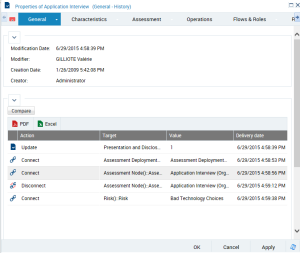
The history page for an object displays:
• who has made modifications on an object
• which values have been modified
• when the modifications took place
Prerequisites for history display
You must first activate the logfile to display the history page.
Accessing history in MEGA Web Front-End
To access page history in the Enterprise Architecture desktop.
Open the properties page for an object and select the
General > History sub-tab.
To open the history in MEGA solutions:
1. Click the object concerned and in the pop-up menu, select History.
A page displaying the chronology of modifications appear.
The history comparison feature
In MEGA Web Front-End the history is used to compare the attributes and the links of an object between two dates.
To run comparison:
In the history page, click
Compare.
Comparing object attributes
The Attribute section enables to display the value of attributes at the specified dates in the Before / After column.
Object type | Value meaning |
Before | Attribute value on the source date ("From") |
After | Attribute value on the target date ("To") |

By default:
• the source date ("From") corresponds to the latest dispatch date
• the target date ("To") corresponds to the current date.
Comparing links
The "Links" section displays the list of links existing around an object.
The Before / After columns display the number of objects connected to the analyzed object on the given dates.
If you click a link, the Details zone displays the objects connected through the link on the source and target dates so as to view differences.