Overridable Metamodel Access
Overridable Metamodel Report
The Overridable Metamodel report details all the overridable MetaClasses, and for each of them:
• its overridable MetaAttributes
• its overridable MetaAssociations (links) and overridable link attributes
 This report is updated automatically with each new batch and should be used as the authoritative source rather than the documentation.
Identifying overridable MetaAttributes of a MetaClass
To view the MetaClasses with overridable MetaAttributes:
1. Access HOPEX Studio desktop (with Hopex Customizer profile).
2. Click the Customization > Overridable Metamodel navigation menu.
 See Customization Menu.
By default the report displays all the MetaClasses with overridable MetaAttributes.
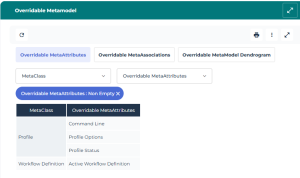
3. (If needed) Use the filtering tools to refine the list: click the MetaClass and/or Overridable MetaAttributes drop-down menu and enter characters in Begins with, Contains, or Ends with field to find a specific MetaClass and/or MetaAttribute.
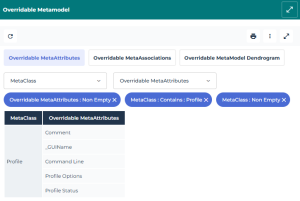
Example: from the MetaClass drop-down menu, in the Contains field, enter "Profile".
The report indicates that the Description, _GUIName, Command Line, Profile Status, and Profile Options MetaAttributes of the Profile MetaClass are overridable.
Identifying the overridable MetaAssociations of a MetaClass
The Overridable Metamodel report displays for each MetaClass:
• its overridable MetaAssociations and associated target MetaClass
• the overridable attributes of the link
To refine the list, you can use the filtering tools available for MetaClass and Target MetaClass.To view the MetaClasses with overridable MetaAssociations:
1. Access HOPEX Studio desktop (with Hopex Customizer profile).
2. Click the Customization > Overridable Metamodel navigation menu.
See Customization Menu.3. Display the Overridable MetaAssociations page.
By default the report displays all the MetaClasses that have overridable MetaAssociations.
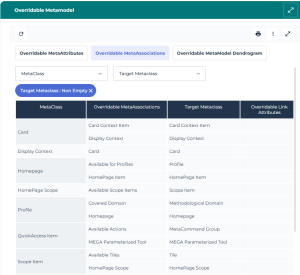
4. To refine the list, click the MetaClass and/or Target MetaClass drop-down menu and use the filtering tool to find the MetaClass(es) or target MetaClass(es): enter characters in Begins with, Contains, or Ends with field.
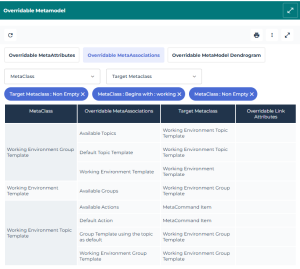
Example: from the MetaClass drop-down menu, in the Begins with field, enter: working.
The report displays the MetaClasses regarding Working Environment Template that have overridable MetaAssociations: Working Environment Template, Working Environment Group Template, and Working Environment Topic Template.
Viewing the overridable Metamodel as a dendrogram
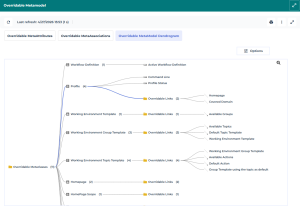
The dendrogram report gives the full picture: it displays all the overridable MetaClasses with:
• their overridable MetaAttributes
• their overridable MetaAssociations
To view the details of all the overridable MetaClasses:
1. Access HOPEX Studio desktop (with Hopex Customizer profile).
2. Click the Customization > Overridable Metamodel navigation menu.
See Customization Menu.3. Display the Overridable Metamodel Dendrogram page.
The dendrogram report displays all the overridable MetaClasses and their overridable MetaAttributes.
The number to the right of an item indicates how many children it has.Example: the Profile MetaClass has 12 overridable children:
- 5 MetaAttributes: _GUIName, Command Line, Description, Profile Status, and Profile Options
- 7 MetaAssociations (links).
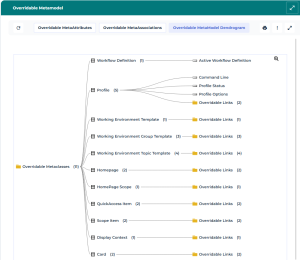
4. Click the number besides Overridable Links folder to view the overridable MetaAssociations (links) of the MetaClass.
Example: the Profile MetaClass has 7 overridable links: Default Widgets, Workflow Participant, Data Access Rule, Homepage, Display Context, Covered Domain, and Report Display Context.