Introduction to Customization
Customization and Hopex Data
Hopex Studio enables creation of your own customization on top of Hopex standard data.
To ensure safe updates of Hopex environments, you should not modify Hopex standard data but instead safely enrich it.
 Hopex standard data is identified by Creator: "MEGA-User".
You can:
• define additional specific data to extend the standard product features
• change some of the standard data to meet specific requirements, without building a full specific feature
Example: you can use a standard profile and desktop, and customize the desktop homepage content, the permissions (CRUD) of the standard profile and standard MetaClasses.
Safe Customization Principle
If you need to change the Hopex standard data, you can override the standard data without overloading it. This ensures that customizations remain isolated and are not impacted by standard Hopex upgrades, while still benefiting from the standard fixes and enhancements.
 This is a prerequisite for continuous delivery, where updates are automatically applied every two weeks for Saas customers or made available for deployment for on-premise customers.
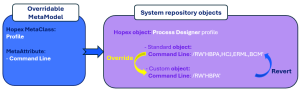
When an item (attribute, link) of a Hopex object is overridden:
• the custom value does not overwrite the standard value.
Instead the modified value is stored separately as a distinct Overridden System Object, which takes precedence over the standard.
• it is possible to revert to the standard configuration if needed.
• changes to the standard value do not impact the overridden value while the override is enabled.
Example:
The overridable MetaModel indicates that the Command Line MetaAttribute of the Profile MetaClass is overridable.
For each profile you can enter a custom value in the Command Line field.
At execution time, the custom value is used instead of the standard value.
If needed, you can revert to the standard value by disabling the override.
Changes to the standard Command Line value do not affect the overridden value while the override is enabled.
Summary:
• Hopex Updates impact only the standard configuration, customizations are not affected.
• Customizations do not impact the standard configuration.
• Each customization can be disabled to revert to (or compare with) the standard behavior.
Where to Perform the Customization
Overriding customizations and importing custom log files must be performed:
• in a Development environment
• with a SaaS "Essential" offer, directly in the Production environment
Accessing the Customization Management Pages
Hopex Studio desktop provides access to the entry points for applying overriding customizations:
• Overridable Metamodel
Displays the report that identifies which Hopex data is overridable.
• Desktops
Used to customize Desktops, including:
• Working Environment Templates
• Homepages
• Display Contexts
• Report Display Contexts
• MetaCommand Groups
• MetaTrees
• Property Pages
Used to customize PropertyPage Presentations, including:
• MetaPropertyPages
• Metamodels
Used to customize MetaClasses including:
• Data Access Rules
• Display Contexts
• MetaWizard Creators
• MetaPictures
• Workflow Definitions
• Code Templates
Used to customize the Code Templates including:
• Translatable Code template
• _GUIName
• Description
• Diagrams
Used to customize DiagramTypes including:
• DiagramType Presentations
• MetaPictures
• Workflow Definitions
Used to customize Workflow Definitions including:
• Owned Actions
• Owned Conditions
• Owned Participants
To access the Customization management pages:
1. Access Hopex Studio desktop (with Hopex Customizer profile).
2. Click the Customization navigation menu.
The Customization management sub-menus appear.
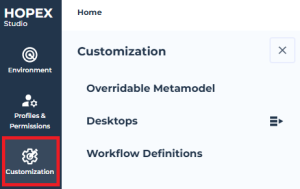
3. Click the relevant sub-menu:
• Overridable Metamodel
• Desktops: Working Environment Templates, Homepages, Display Contexts, Report Display Contexts, MetaCommand Groups, MetaTrees
• Property Pages
• Metamodels
• Code Templates
• Diagrams
• Workflow Definitions
Alternative: click each corresponding  to display the elements in the Browse area, facilitating navigation (see Browse area).