Customizing an Object Property Page
Prerequisites:
• Development environment
 Production environment for a Functional Administrator with a Saas "Essential" offer.
• UI language identical to the compilation language
If your UI language differs from that of the compilation, a message prompts you to change it.To customize an object property page:
1. Access the object property pages (of the object type you want to customize).
E.g.: an Application property pages.
2. Display the page you want to customize.
E.g.: the Characteristics page.
3. Click Customize > ‘<Page name>' page.
E.g.: Customize > ‘Characteristics' page.
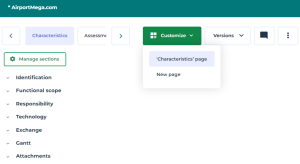
The customization page displays and the first section is initialized.
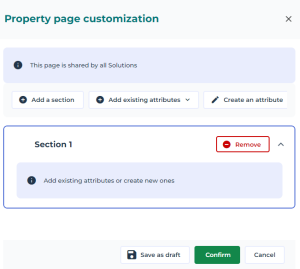
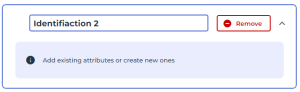
4. (Optional) Double-click Section 1 and enter the name of you section.
The name of the section must be entered in the user interface language. If your data is in a different language, a flag indicates the language used to enter the name.E.g.: Identification 2
5. Add one or more attributes:
You can add existing attributes or create other ones.
• Click Add existing attributes or Create an attribute.
To create attributes, see Attribute Creation.• In the list, select the attributes. Attributes are added to the section as you select it.
 If needed, use the dedicated search field to access the attribute. Enter characters in the dedicated search field: as you enter characters the list narrows down.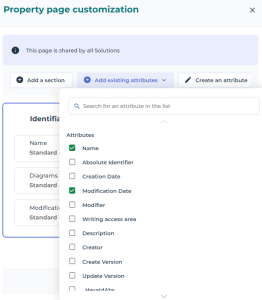
6. (If needed) Click Add a section and configure another attribute group in the same way.
7. (If needed) Reorganize your attributes ans sections.
8. If your customization:
• is complete: click Confirm to apply your customization to all of the objects of the same type.
See Managing a Page.• is not complete: click Save as draft and confirm your action (Save as draft and close), to complete the parameterization later on. Other persons can modify this draft.
If you want to delete your customization, click Cancel.