Describing a Operational Domain

Accessing the Operational Domain list
To access the Operational Domain list:
1. From the Operational navigation menu, select Hierarchy.
2. Expand the current enterprise folder, as well as its Operational Domain folder.
The tree of Operational Domains appears.
The properties of a Operational Domain
The Characteristics properties page of a functional area provides access to:
• its Name,
• its Owner, by default on creation of the Operational Domain, the current enterprise.
• the text of its Description.
• its Owned Realizations
 For more details on fulfillments, see Capability Fulfillment.
With HOPEX UAF, a Operational Domain is described in the following pages:
• the Structure page, which provides access to the list of components of the Operational Domain.
For more information on the components of a Operational Domain, see Operational Domain diagram.• the Performed Process page, which provides access to the Operational Activities executed in the context of the Operational Domain.
For more details on Operational Activities, see Using Operational Activities.• the Diagram page is used to manage the Operational Domain diagrams:
Operational Domain diagram
A Operational Domain diagram describes the service interactions between the main internal components of the architecture described. It thus describes:
• the Operational Domain Roles,
In this example, the history Operational Domain is based on the Operational Domains for selling, delivering and command.
• the Operational Roles.
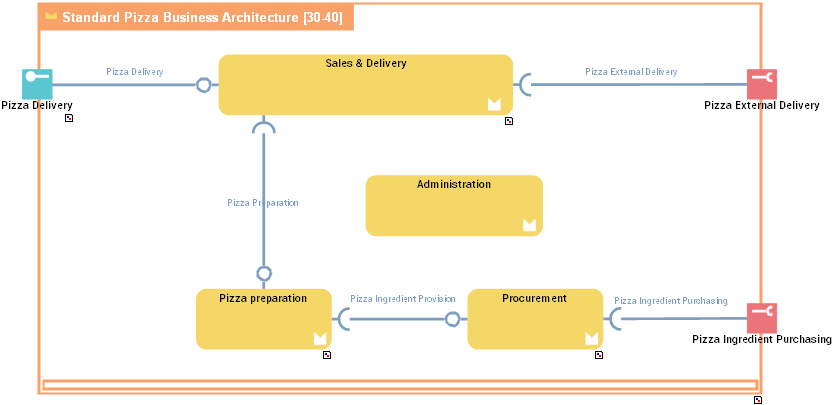
With HOPEX UAF, communications are based on:
• access points: service points and request points.
For more details on service interactions between components, see Describing Service and Request Points.• service interactions
For more details on service interactions between components, see Creating a Service Interaction from a diagram.