Services - Connectivity
The Connectivity aspect of the Services view helps UAF Architects in the specification of service interfaces, e.g., provided and required service methods, signal receptions, and/or flow properties, to ensure compatibility and reusability of services.
Using Interfaces from Services view

To access the list of Interfaces:
1. From the Services navigation menu, select Connectivity.
2. Click the Interfaces tab.
The list of the Interfaces is displayed.
Using Signals from Services view
To access the list of Signals:
1. From the Services navigation menu, select Connectivity.
2. Click the Signals tab.
The list of the Signals is displayed.
Using Service Interactions
To access the list of Service Interactions:
1. From the Services navigation menu, select Connectivity.
2. Click the Service Interactions tab.
The list of the Service Interactions is displayed.
For more details on the creation of Service Interactions with HOPEX UAF, see Using Service Interactions.
Using Service Dependencies
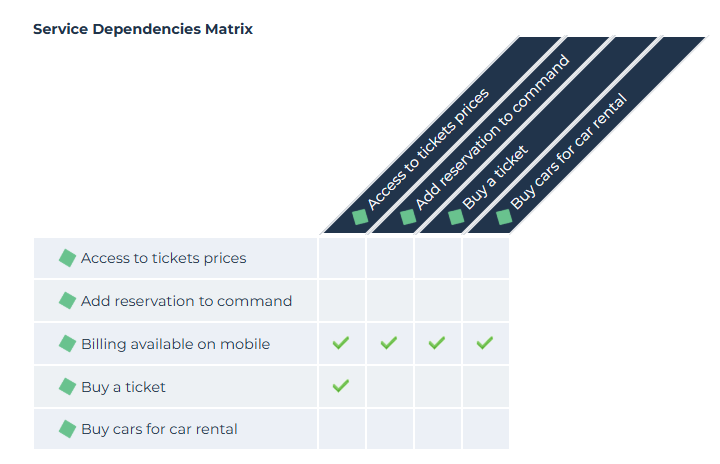
Services are represented by Functionalities. For more details on the dependencies between functionalities, see Defining Functionality dependencies.
To access the list of Service Dependencies:
1. From the Services navigation menu, select Connectivity.
2. Click the Service Dependencies tab.
The list of Service Dependencies Matrix appears.
To create a Service Dependencies Matrix:
1. From the Services navigation menu, select Connectivity.
2. Click the Service Dependencies tab.
The list of Service Dependencies Matrix appears.
3. Click New.
A creation wizard opens.
4. Enter the name of your matrix.
5. Click Connect to select the type of Service Catalog that interests you and select the objects.
6. Click Connect and OK.
The corresponding Service Dependencies Matrix appears.