Describing Functionalities

Describing Functionality Maps
A functionality map describes all the functionalities the enterprise is able to cover for its internal needs or for meeting the needs of its clients.
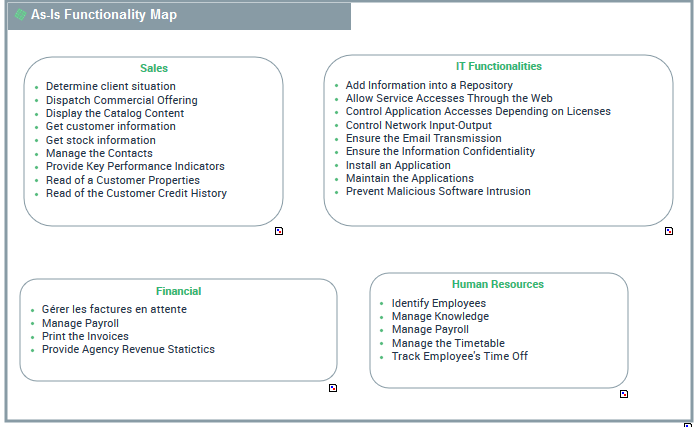
Example of a functionality map
 For more details on managing a functionality map, see Describing the Functionality Map.
Accessing Functionality Maps
To access the list of Capability maps:
1. From the Services navigation menu, select Taxonomy.
2. From the Functionalities tab, select Functionality Map sub tab.
The list of functionality maps is displayed.
Creating a Functionality Map
To create a Functionality Map:
1. From the Services navigation menu, select Taxonomy.
2. From the Functionalities tab, select Functionality Map sub tab.
The list of functionality maps appears.
3. Click New.
A creation dialog box opens.
4. Specify the Name and click OK.
The new functionality map appears in the list.
Creating a functionality map diagram with HOPEX UAF
A functionality map can be described by two diagram types:
• a functionality decomposition tree is a diagram that describes the tree structure of a functionality. Focusing on a particular functionality, this type of diagram enables summary representation of functionality breakdown into sub-functionalities.
• A structure diagram used to represent the set of functionalities with their dependencies that, jointly, define the scope of a hardware or software architecture corresponding to the Functionality Map.
To create a functional map diagram:
1. Right-click the functionality map that interests you and select Create Diagram.
2. Select the diagram type.
The diagram opens in the edit area. The frame of the functionality map described appears in the diagram.
Creating a functionality component in a functionality map diagram
The components represented in a functionality map are Functionality components.
To add a functionality component in the functionality map diagram:
1. In the diagram insert toolbar, click Functionality Component.
2. Click the functionality map frame.
The functionality component creation window opens.
3. Click, for example, Reusing an Existing Functionality.
4. Click Display Scope to access the list of functionalities linked to the enterprise.
5. Select the functionality that interests you.
6. Click OK.
The functionality component appears in the diagram.
Defining Functionality dependencies
A dependency link between one functionality and another is used to specify the elements on which this dependency is based.
To create dependency links between two functionalities in a functionality map diagram:
1. In the insert toolbar, click Functionality Dependency.
2. Click the functionality component, and keeping the left mouse button pressed, move the cursor to the functionality component used.
3. Release the mouse button.
The dependency link appears in the diagram.
Describing a Functionality
The Characteristics properties page of a functionality provides access to:
• its Owner, by default during creation of the functionality, the current enterprise.
• its Name,
• the text of its Description.
• its Desired capability effect.
For more information on the desired capbility effects, see Creating a Functionality Diagram with HOPEX UAF.Creating a Functionality Diagram with HOPEX UAF
The Functionality Decomposition Tree is a diagram that describes the tree structure of a functionality. Focusing on a particular functionality, this type of diagram enables summary representation of functionality breakdown into sub-functionalities.
To create a functionality diagram:
1. Right-click the functionality that interests you and select Create Diagram.
2. Select Functionality Diagram.
The diagram opens in the edit area. The frame of the functionality described appears in the diagram.