Describing an Interface
An Interface represents the exchange of information between architecture components.

The content of a service interaction is described by an interface.
An service contract is described by a sequence of operations which are represented:
• By interfaces used,
• Or by service operations used.
 For further detail on service operations, see Describing a Service Operation.
Examples of Interface Diagrams (BPMN)
An Interface is described by a sequence of steps which are represented:
• By service operations used,
• By Interfaces used.
The Interface roles, presented at the border of the frame, represent participants:
• customer/supplier, or
• sender/recipient
An Interface can be described by involving more than two participants. In this case, a role is consumer of the Interface and the others are providers.
Example of Interface Diagram (BPMN)
The Interface diagram associated with the “customer identification protocol ” describes in BPMN formalism the operations executed.
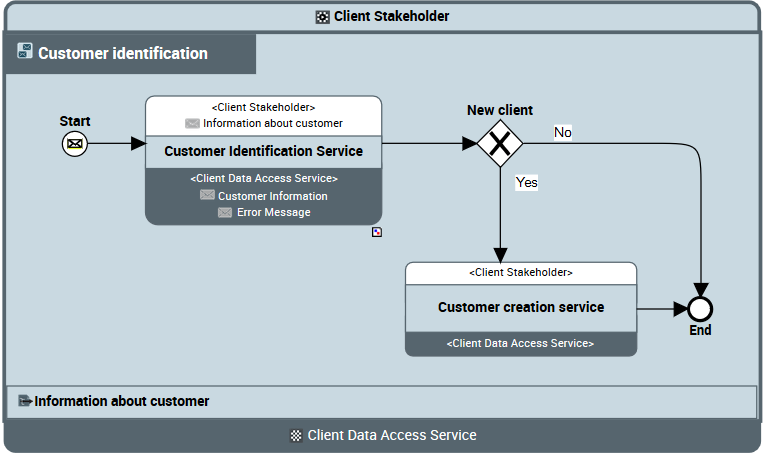
Interface Diagram (BPMN) "Customer Identification"
Customer identification protocol starts with a customer identification step. If the customer is found the Interface returns customer information, if not, a “customer creation” Interface is activated.
Example of an advanced Interface communication
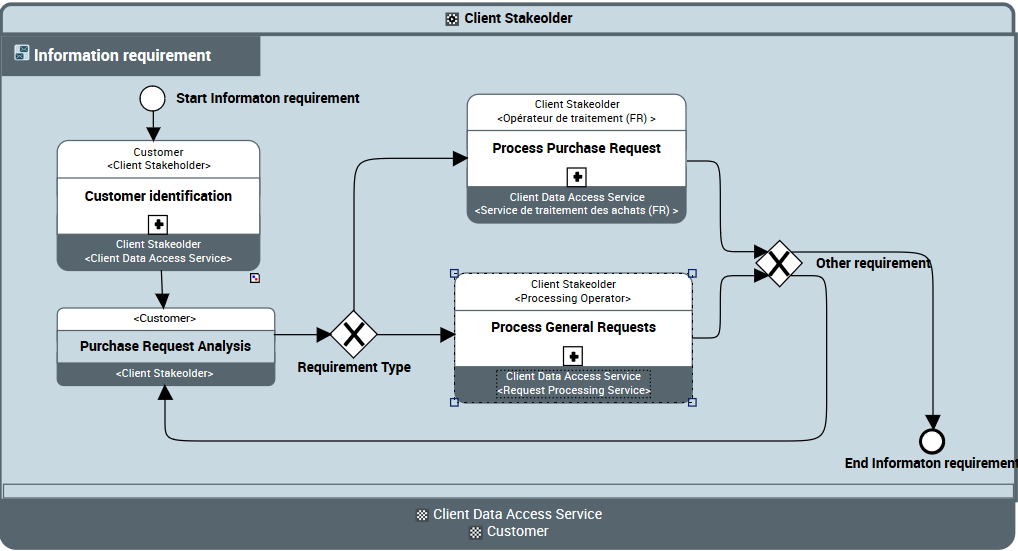
“Information Requirement” Interface diagram (BPMN)
The "Information Request" Interface is used by Center call center to take account of a customer request online. There are therefore three participants in this Interface: the customer, the IT applications and the customer representative who is the effective requester of the service (in this case the call center).
This Interface consists of identifying the customer, then analyzing the request. The request is then processed as a purchase request or as another request if it is an information request for example.
The Roles property page provides access to the list of contributor roles and to the initiator role of an Interface.Accessing the list of Interfaces
To access the list of Interfaces:
1. From the Operational navigation menu, select Connectivity.
2. Click the Interfaces tab.
The list of the Interfaces is displayed.
Creating an Interface
You can create an Interface:
• from a library,
• from a diagram using service interactions, for example.
Whatever the point of origin, you can create Interface in standard mode or using an Interface template.
For more details on Interfaces, see Using an Interface Template.To create an Interface in standard mode, in a diagram, from an service interaction:
1. In the objects toolbar for a diagram, click Service interaction 
2. Draw a link between the two communication entities.
3. In add service interaction window, click the arrow at the right of the field Interface and select Create an Interface.
The creation window appears.
4. Select the Creation Mode: Standard Creation.
For more details on Interface template use, see Creating an Interface from an Interface template.5. Enter the Interface name in the Name field.
6. Click OK.
7. In the service interaction creation dialog box, enter the name of the service interaction using the name of the Interface and click Add.
The service interaction and the Interface are created.
Properties of a Interface
The Characteristics properties page of the Interface provides access to:
• its Owner, by default the owner is the current Enterprise.
• its Name,
• the text of its Description.
• the text of its Description.
• the Business Information Used section provides access to the list of concept elements. See Concept.
Creating an Interface Diagram (BPMN)
An Interface is represented by an Interface Diagram (BPMN).
To create an Interface Diagram (BPMN) from an interaction service:
1. From the Environment navigation menu, open the exploration area Container > Libraries.
2. Unfold the desired library, and then the Interfaces folder.
The list of Interfaces accessible from the library appears.
3. Select the associated Interface and, in its pop-up menu, click Create Diagram
4. In the dialog box, select Interface Diagram (BPMN)
The diagram opens with Interface frame and the two roles representing consumer and the supplier.
The events, gateways and sequence flows of your diagram follow the BPMN standard.
For more details on events, gateways and sequence flows, see Managing events, gateways and sequence flowsDefining a Service operation or an Interface
In an Interface diagram (BPMN), operations are described by:
• Interfaces used
• Service operations used
To create a used Interface used:
1. Select the Interface Used  button and click in the diagram within the Interface frame.
button and click in the diagram within the Interface frame.The Interface appears in the diagram.
2. Open the Characteristics property page of the Interface.
3. Click the arrow to the right of the Specification of an Interface used box.
4. Select Connect Interface from the drop-down list and choose the Interface that you want to use.
The Service operations page provides access to the list of components of the exchange contract.