Mapping
Mapping Diagram
The following diagram fully describes the process of mapping a user, whose login is authenticated, with a person in HOPEX.
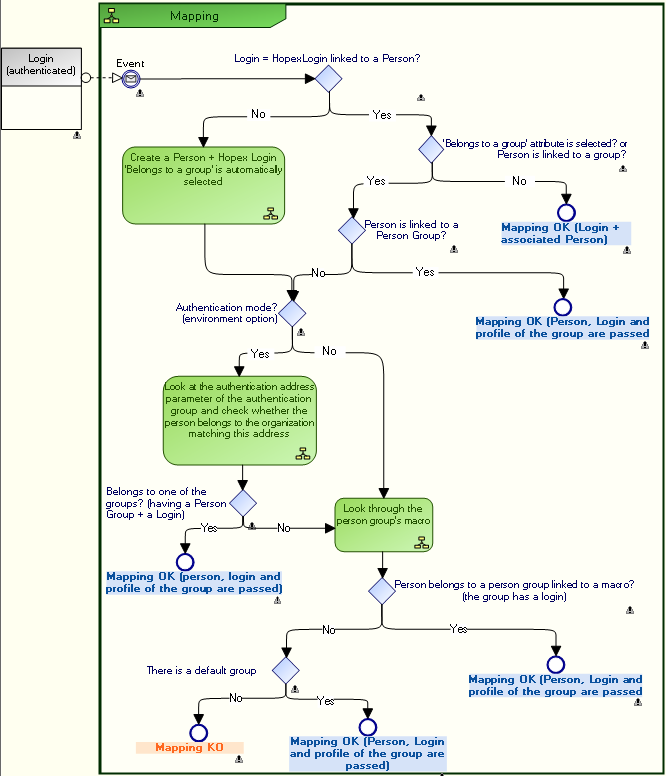
Principle
Once the mapping service is informed of the identifier of the person requesting connection, the service checks if this identifier is referenced in the repository:
 This identifier is usually the login, but if an SSO authentication parameter is defined and that its "Is Index On Person" attribute is selected, then the service checks if the value of this attribute does not exist on a person, and in this case it is this identifier that is used to determine if the person exists in HOPEX or not.
• Case 1:
The identifier is referenced in the repository and does not belong to a group.
• Case 2:
The identifier is referenced in the repository and belongs to a group.
• Case 3:
The identifier is not referenced in the repository and does not belong to a group.
When a default group is defined, any person not belonging to a specific group, but with the "Belongs to a person group" attribute selected, must belong to the default group.
Connection request and user created on the fly
In SSO authentication case, when an authenticated user requests connection to HOPEX:
• If the login of the user is connected to the Login of a Person saved in HOPEX and this person:
• does not belong to a group, the mapping is validated and the user can choose to connect with one of his assigned profiles. The connection is made as the person.
• belongs to one or several groups, the mapping is validated and the user can connect with one of the groups and choose one of the profiles assigned to the selected group. The connection is made as the group.
• belongs to one or several groups and has one or several assigned profiles, the mapping is validated and the user choose to connect with one of his assigned profiles (the connection is made in the name of the person) or via one of the groups he belongs to (the connection is made in the name of the group).
• If the login of the user:
• corresponds to the Login of a person saved in HOPEX, that the "Belongs to a person group" attribute is selected, but the Person is not connected to a Person Group,
or
• does not correspond to the Login of a person saved in HOPEX and authentication is SSO type, then the person is created on the fly with a Login (the "Belongs to a person group" attribute is automatically selected).
The person is created on the fly only if it does not exist. If the person exists, only the login is created.The person (+ Login) is only created if it effectively belongs to a group (SSO, connected to a macro, or "default group" is defined).So if the person:
• belongs to an SSO group (with Person Group and Login) the mapping is validated and the connection is made in the name of the group (login and profile of the group are passed).
E.g.: Alexandre DUBOIS belongs to the Marketing group whose login is Marketing,
• does not belong to an SSO group, but belongs to a group linked to a macro: the mapping is validated and the connection is made as the group (login and profile of the group are passed).
• does not belong to an SSO group, neither to a group linked to a macro, but a default group is defined: the mapping is validated and the connection is made as the group (login and profile of the group are passed).
• does not belong to an SSO group, neither to a group linked to a macro, and a default group is not defined: the mapping is rejected.
When the person belongs to a group, the service returns two pieces of information:
• The person created on the fly (Assignable Element) from the SSO server.
The aim of creating a person on the fly is to keep a record of actions. The user acts in his/her name and not in the name of the group.
• The list of the person groups he/she belongs to (and his/her assignments, if he/she has profiles assigned).
A profile is associated with the group. This indicates with which profile the person created on the fly will connect to the application.
At the next connection of this person, the service returns the same user created on the fly (same information/attributes). The service creates a user on the fly per person and saves his/her information.Associating a HOPEX User Group with an Authenticated User Group
Once the authentication group is created, you must associate it with a HOPEX user group.
So that when a person of the HOPEX person group connects to HOPEX, he/she is authenticated thanks to the user group authenticated to the SSO service.
If a default person group is defined, any person in HOPEX with the Belongs to a person group attribute selected (see Person Properties) automatically belongs to the group defined by default (see Defining a default connection group).Prerequisite: the HOPEX person group and the authenticated user group are created.
See:To associate a HOPEX user group with an authenticated user group:
1. Access the properties of:
• the authentication group
or
• the person group.
2. Display the Characteristics page.
3. Click the arrow of:
• the Person group field and connect the HOPEX person group to be associated with the authenticated user group.
or
• The Authentication group field and connect the authenticated user group to be associated with the person group.
The authentication Group query wizard appears.
 Use the [Ctrl] key to select several authentication groups at the same time.
The HOPEX person group is associated with the authenticated user group.
Defining an Authentication Parameter
An authentication parameter is a parameter that exists in the SSO service and that is associated uniquely with a HOPEX attribute.
Configuring an authentication parameter is useful when importing persons from an SSO service.
Authentication parameters enable to:
• identify a person from the authentication server.
• predefine the characteristics of a person created in HOPEX, using the mapping between the authentication parameter values (stored in the SSO service) and the HOPEX MetaAttributes.
Example: the "E-mail" MetaAttribute of the person is initialized with the "email" claim of the person in the SSO service (if mapping has been carried out).
To configure an authentication parameter:
1. Access the authentication management pages.
2. Select Authentication parameters.
3. Click New  .
.
.The authentication parameter enables pre-completion of characteristics of a person corresponding to the authentication parameters.4. Enter a Name for the authentication parameter then click Properties  .
.
.Examples: E-mail, Name (person).
5. (Optional, "expert" metamodel access) Select Index on Persons, so that the parameter value enables unique identification of a person. If a person in HOPEX has the same e-mail as a person defined in the SSO service, this person is reused (instead of creating a new person and risking duplicating the same person).
6. (Optional, "expert" metamodel access) Select Is available for search so that an e-mail can be entered in the import entry area.
Example: if you enter ctodd@mega.com, you should find Clara TODD.
7. In the Authentication identifier field, enter the claim associated with the SSO service.
E.g.: email
8. In the Mapped MetaAttribute field, click the arrow then select Connect MetaAttribute.
9. Perform the search then select the HOPEX MetaAttribute you want to associate with the SSO authentication identifier defined step 7.
Examples: E-mail, Name (person).
10. Click Connect.
11. Click OK.