Person Properties
 To consult the properties of a person, see Viewing the Characteristics of a Person.To define the properties of a person, see Defining a Person.
Personal characteristics
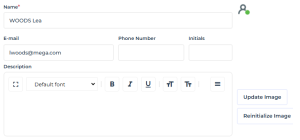
Name
The name of the person can include name and first name. It can comprise letters, figures and/or special characters. Format of the name of the person is free. It is recommended that the same format be used for all persons.
E.g.: DURAND Pierre
Image
You can download an image in .ico, .bmp, .gif or .png format up to a size of 30 MB.
E-mail
The e-mail address of the person is required, for example, for the user to define his/her password, for distributing documents, receiving notifications and questionnaires, or when a user loses his/her password.
Example: pdurand@mega.com
Phone number and initials
The phone number and initials of the person are optional.
E.g.: +33102030405 / DP
Description
This text field is free and optional.
Application Access
The user access to the application is defined by his/her Login.
If the user connects as a group, his/her access is defined by the information of the login of the group.
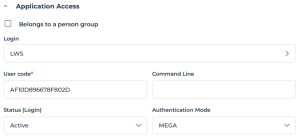
Belongs to a Person Group
A person can:
• belong to a group
• have the Belongs to a person group attribute selected
When the person has the “Belongs to a person group” attribute selected, the person belongs to a dynamic group (SSO group).
When the person has the “Belongs to a person group” attribute selected, but the person is not listed in a person group, this means that the person is not directly connected to a group or does not belong to a dynamic group (SSO group): the person belongs to the default group.
When you select the Belongs to a person group attribute, the person can connect to the application with one of the profiles defined for the group or with one of the profiles assigned to him/her.
Login
It is defined by the following parameters:
• User code
• Command Line
• Status (Login)
• Last Connection Date
• Authentication Mode (case of authentication managed within HOPEX)
Data access
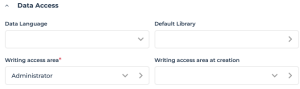
Data Language
The Data Language attribute of the person enables to define a specific data language for this user. It is the language in which data names are displayed by default, in case several languages are available.
By default, the data language is defined at installation in the environment options for all users (Options>Installation>Languages) with the Data language option.Default library
The Default Library attribute enables attachment of objects created by the person in a library, when the creation context does not permit this.
Person reading access area and reading access area at creation
Information related to the reading access area is only visible when the Activate reading access diagram option is selected in the Environment Options (Compatibility > Windows Front-End > Administration).Certain objects or modeling projects may be confidential or contain data (costs, risks, controls) that should be visible only to authorized users.
The HOPEX administrator can hide objects corresponding to this confidential data.
To implement a data confidentiality policy, objects must be organized in distinct sets. Each set of objects constitutes a reading access area.
Each user is associated with a reading access area that determines objects the user can see. A user can only see objects located in his/her own reading access area or in the lower reading access areas.
Writing access area and writing access area at creation
Writing access management is available with the HOPEX Power Supervisor technical module. A writing access area is assigned to an object to protect it from inadvertent modifications. At creation, an object takes the writing access area of the user that creates it.
By default, a new user is connected to the only writing access area: "Administrator".
There is a hierarchical link between writing access areas: a user can only modify an object when he/she has the same writing access level as this object or a higher writing access area level.
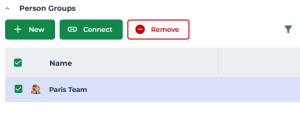
Person Groups
A person can belong to one or more person groups. The person can thus connect to the application as a group with one of the profiles assigned to the group.
The groups to which the person belong are listed here.
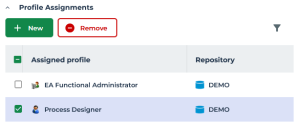
Assignments - Profile Assignments
To connect to HOPEX, a person must have at least one profile assigned. The profile determines:
• the objects and tools the person can access
• the desktops the person can access
• the repository access
• the product access
See Profile Description.