Login Properties (Person)
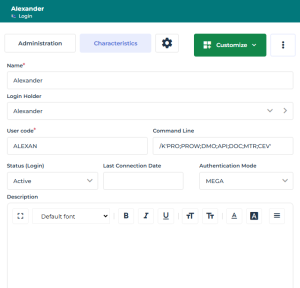
To:
• view the login characteristics, see Viewing the Characteristics of a Login.
• configure the login of a person, see or Defining the Login of a Person.
User code
The User Code is the short identifier of the user that serves as the basis for private workspace naming.
This code is automatically defined on user creation (upper case, 16 alphanumerical characters). To ensure data consistency, it should not be modified.
E.g.: D312DF9467BD6312
Login holder
The Login Holder is the person associated with the login.
E.g.: WOODS Laura
Status (Login)
Login status can be used to make a user inactive (value: Inactive). The user no longer has access to repositories, but trace of his/her actions is retained. The user can be easily reactivated (value: Active).
 When you delete a user from the repository, the commands connected to this user become orphans and you lose part of the history saved in logs. With Inactive status, the user no longer has access to repositories, but the history of commands connected to the user is kept in logs.
Last connection date
The last connection date indicates the last time the user accessed HOPEX.
Products accessible on the license (Command Line)
The Command Line field enables restriction of access of a user or profile to available products.
 For more details, see Products accessible on the license (Command Line).If a user is connected to a profile, and both the user and profile have access to products restricted by the Command Line attribute, the products accessible to the user are the intersection of the values of the Command Line attribute of the user and profile.
Authentication mode (case of authentication managed within HOPEX)
The user authentication is performed by checking the user password. Authentication modes managed within HOPEX are:
• MEGA (default value)
The HOPEX authentication service checks that the password entered matches the (hashed and encrypted) password stored in HOPEX repository.
• HAS UAS
Password management is delegated to the UAS application of HAS. In this configuration the user cannot connect to HOPEX (Windows Front-End).