Managing Named Licenses
Assigning Named Licenses
Assigning named licenses ensures that each user has exclusive access to HOPEX products, unlike floating licenses, which may be temporarily unavailable when all are in use.
Licenses are assigned based on the products specified in the Command Line fields of the user's profile and login.
 See Products accessible on the license (Command Line) of the profile and Products accessible on the license (Command Line) of the person's login.
To assign named licenses:
1. Access the Persons management page.
2. Select the person concerned.
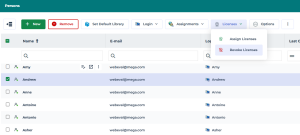
You can select several persons.3. In list menu bar, click Licenses > Assign Licenses.
Licenses are assigned according to the command line configuration.
A warning message is displayed if any of the required licenses is unavailable.

Revoking Named Licenses
Revoking named licenses helps optimize license usage by making unused licenses available. Once released, they can be reassigned as needed.
All named licenses associated with the user are revoked simultaneously.
If a user has multiple profiles, the named licenses associated with all of their profiles are revoked. To revoke named licenses:
1. Access the Persons management pages.
2. Select the person concerned.
You can select several persons.3. In list menu bar, click Licenses > Revoke Licenses.
A confirmation of the license revocation appears.
These licenses become available and can be reassigned to another person.
Viewing all Licenses
To support license management, the License Dashboard provides an overview of all assigned named licenses, as well as floating licenses (if applicable).
To view all licenses:
 Access the License Dashboard.
 Several reports appear based on the licenses subscribed.
Named licenses consumption
This report shows:
• the number of assigned named licenses
•  the number of users currently logged in
the number of users currently logged in •  the number of users currently logged out
the number of users currently logged out•  the number of available named licenses
the number of available named licenses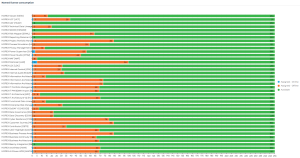
Floating licenses capacity
This report shows in real time the number of:
• used floating licenses
used floating licenses • available floating licenses
available floating licenses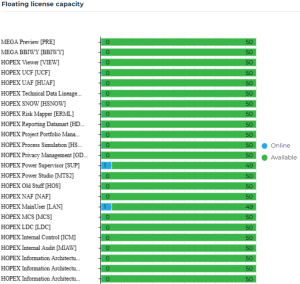
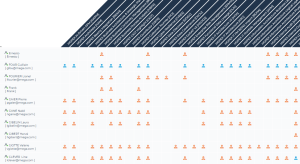
Assignements of named licenses
This report shows the named licenses assigned to each user.
•  : the user is currently logged in.
: the user is currently logged in. •  : the user is currently logged out.
: the user is currently logged out.