Compulsory Actions to Define a User
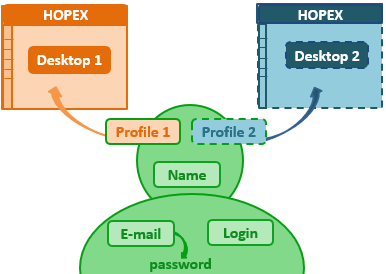
To create a user who can access HOPEX you must:
• define the name of the person
 See Creating a User.
• define the login of the user
 A person must have a login to be able to connect to HOPEX.
The login of the user is automatically created at creation of the person (see Creating a User).
If needed, see Creating the Login of a Person.• define the e-mail address of the person
The e-mail address is required, for example, for the user to define his/her password, for distributing documents, receiving notifications and questionnaires, or when a user loses his/her password.
See also Configuring SMTP Settings.• assign a profile to the person
To access HOPEX, the user must have at least one profile assigned, or must belong to a person group.A person belonging to a person group can log in with a profile assigned to the person group. It is not necessary to assign a profile to this person.
E-mail, password, and SMTP parameters
With the HOPEX authentication system (UAS), a user needs a password to log in.
The user defines his/her password on reception of his/her HOPEX account activation e-mail. This e-mail includes a link valid for 48 hours.
If the HOPEX SMTP settings:
• are configured:
As soon as the user email is entered, the user automatically receives an e-mail to define his/her password.
To resend the account activation e-mail, see Initializing a User Web Account.• are not configured:
The Password field is available at user creation. You must then define this temporary password, that the user has to change at first connection.
If needed (e.g.: troubles with password or e-mail reception), the administrator can define a temporary password for the user.