Managing the Object Follow-up
You can receive a notification and/or an email when an object is modified. To do this, you must follow the object.
 To view the activity on the objects that you are following:Accessing the activity on the objects that you are following see
You can follow:
• all objects to which you have access in HOPEX
See Following an object.• all objects for which you participate to a review note
Following an object
You can stop following an object at any time.When modifications are performed on an object that you follow:
• you are notified by email,
• in the main toolbar of your HOPEX desktop, a red dot indicates that you have unread notifications  .
.
.When a user dispatches modifications on the object, you receive a notification according to your notification configuration.
By default, notifications are sent once a day (at midnight), to modify this setting see Configuring management of your alerts.To follow-up on an object:
1. In your HOPEX desktop, access the object you want to follow.
2. Right-click the object and select Follow  .
.
.The object is added to the list of objects you are following.
Accessing the list of objects you are following
To access the list of objects you are following:
1. On your HOPEX desktop, click the Collaboration menu .
2. Select Notifications and Activities > Followed Objects 
The object you are following are listed by type.
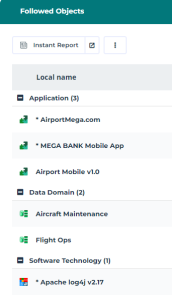
You can perform actions on these objects.