Authentication in HOPEX
Authentication is a process consisting of verifying that a person corresponds to his or her declared identity. In IT networks, authentication is usually based on a connection name and a password.
By default, in HOPEX (Web Front-End) authentication is managed by HOPEX Unified Authentication Service (UAS).
 See Installation and Deployment > HOPEX Unified Authentication Service documentation.
Unique authentication, known as Single Sign On (SSO) or Unified Login, is a software solution that enables company network users to access all authorized resources in total transparency, on the basis of unique authentication at initial network access.
In this way, a single password enables access to all company applications and systems.
This solution offers several advantages, including:
• greater security
The user no longer has to remember several connection procedures, identifiers or passwords.
• improved administrator productivity.
HOPEX integrates into enterprise directories, which reduces administrator workload regarding password management.
The Single Sign On system used in HOPEX is based on standard security protocols natively integrated in Windows: Kerberos, SSO and LDAP. In addition, HOPEX Single Sign On complies with the following recognized standards:
• Windows Security Services
• C2-Level Security of the American Defense Department
• LDAP via ADSI
• Kerberos
• NTLM Authentication
For more details on single sign-on, see "Single Sign-On in Windows 2000 networks" document at the following Web address:http://technet.microsoft.com/fr-fr/library/bb742456.aspx
Authentication and Mapping Principle
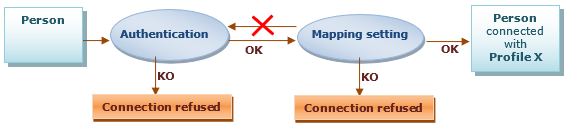
The connection to HOPEX includes the following phases:
• Phase 1: Authentication
The authentication phase consists in checking that the person connecting to HOPEX exists and that his/her identification is valid. This authentication can be independent of the HOPEX repository.
Once validated, this authentication phase is not called later at the mapping phase.
• Phase 2: Mapping
The mapping phase consists in defining the profile with which the authenticated person will connect to the application.
Without a profile assigned the connection is refused to the user, even authenticated.
• Phase 3: Connection and access to the repository
Once authentication and mapping phases are validated, the person can connect to the application and access the repository.
The person selects the repository and the profile with which he/she wants to connect.
Introduction to Authentication in HOPEX (Web Front-End)
In HOPEX (Web Front-End) authentication is managed by HOPEX Unified Authentication Service (UAS). UAS enables to define how the user authenticates.
For a detailed description, see Installation and Deployment > HOPEX Unified Authentication Service> UAS Configuration documentation.Choosing an authentication mode
To select your authentication mode, MEGA recommends that you use authentication systems that comply with Standards (e.g.: SSO, LDAP). You can choose an authentication managed:
• by an external module
If your enterprise has an external authentication or SSO module, it is preferable to use the delegated authentication system.
Example: SAML2, OpenId.
• within the HOPEX platform (by default)
• LDAP
If your enterprise has an LDAP authentication system, it is preferable to manage your authentication using an LDAP directory.
• Standard (by default)
If you have no standard authentication system in your enterprise, you can use the authentication system managed within HOPEX.
Defining an external authentication mode
By default, authentication is managed within HOPEX platform.
You can choose to define an external authentication:
• SAML2
• openId
To define and configure your external authentication mode, see Installation and Deployment > HOPEX Unified Authentication Service documentation.