Defining Default HOPEX Authentication Mode
By default, authentication is managed within HOPEX platform.
 Configuration of authentication delegated to a third party service is described in Installation and Deployment > HOPEX Unified Authentication Service documentation.
In the environment options, you can view and modify the Authentication Mode.
This Authentication Mode enables to define the default Authentication Mode value (on the Login) of the user at creation.
Viewing the default authentication mode
In the environment options, the default Authentication Mode values are:
• Standard (by default at installation)
• LDAP
To view default authentication mode:
1. Access environment options.
2. In the options tree, select Installation > User Management > LDAP folder.
3. In the right pane, view the value of the Authentication Mode option.
Defining default authentication mode to LDAP
When you define the default authentication mode to LDAP, users are managed in an LDAP directory and authentication is managed by the LDAP directory.
When you change the default authentication mode while users are already created, these users keep their defined authentication mode.
To change the authentication mode of a user, see Modifying a user authentication mode.However, if you define the default authentication mode to LDAP, at authentication, whatever the person, the authentication service checks if the person belongs to LDAP. If the answer is:
• yes, the person is authenticated via LDAP.
• no, the authentication service checks on the login of the person if another authentication mode is defined.
See also the full authentication diagram (including person groups): Mapping Diagram.To define default LDAP authentication mode:
1. Access environment options.
2. In the options tree, select Installation > User Management > LDAP folder.
3. In the right pane, for:
• the Authentication Mode option, select "LDAP" value.
• the Default writing access area for LDAP import, select the writing access area you want to define to the persons at LDAP import.
Modifying a user authentication mode
User authentication mode is defined on the login by the Authentication Mode parameter.
The value of this parameter is inherited at user creation from the value of the Authentication Mode option defined in the environment options (Viewing the default authentication mode).
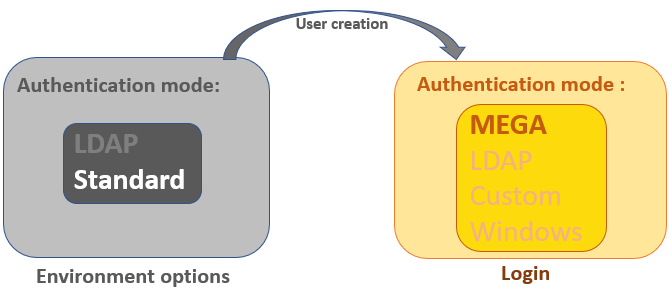
In "Standard" authentication mode, HOPEX (Web Front-End) provides the MEGA authentication mode (by default): the HOPEX authentication service checks that the password entered matches the password stored in HOPEX repository.
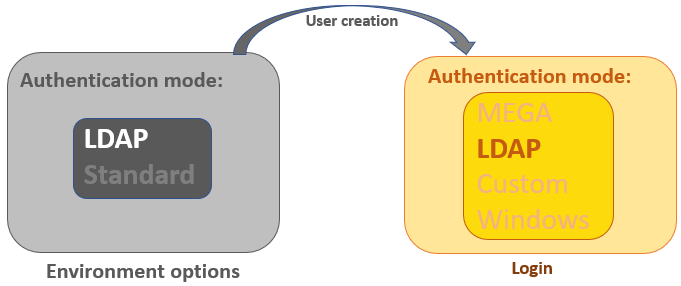
In "LDAP" authentication mode, HOPEX (Web Front-End)provides the LDAP authentication mode (by default).
To modify the authentication mode of a user, see Defining the Login of a Person.