Launching the Excel Export Wizard
Accessing the Excel export wizard
You can run the Export Wizard from:
• your HOPEX workspace,
• the Administration desktop.
To access the wizard for export of data to an Excel file:
1. Check your export options. See Checking the Excel import/export usage options.
2. On the HOPEX work area: click Main menu > Export > Excel.
 On the Administration desktop: in the Tools pane, select the Excel > Export sub-folder.If this function is not available, open the options window, select Tools > Data Exchange > Export > Tools/Third Party Formats and check that option Excel (.xls, .xlsx) is selected.
The import wizard opens. See Defining the export file template.
Defining the export file template
Excel export through the wizard is in three steps:
At each of these steps, it is possible to pass to the next step or return to the previous step.
So as to ease file parameterization and/or object selection, the HOPEX wizard enables you to use already structured files.
You can use:
• Either a Predefined Template File
 A Predefined Template file is an export file template supplied as standard with HOPEX.For more details on predefined files, see Creating Predefined Excel Template Files(Windows Front-End).
• Either a User Template File
A User Template File is a file created at a previous export. You can also reuse objects of this file.Afterwards you can modify the selected structure so that the generated file will differ from the template file. • Or a new empty file created automatically.
You then have to define the file structure. To select the export mode for the file:
1. Run the export wizard. See Accessing the Excel export wizard.
The export wizard appears.
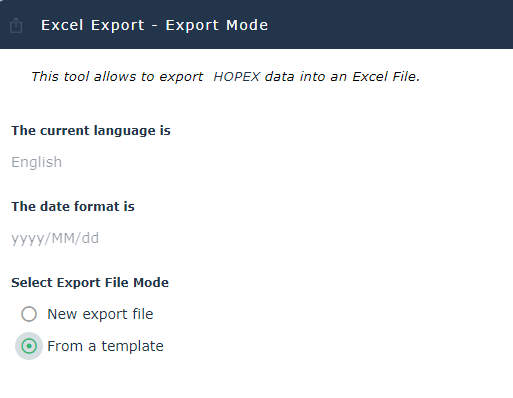
2. Select the export mode for the file:
3. Click Next.
Using new export file
To export data in a new file Excel:
1. In the export wizard, select the use of a new export file, see Defining the export file template.
The export file selection wizard appears.
2. (Option) Modify the result Excel Export file name or format which is initially empty.
By default the export file format is .xlsx. Using new template file
To export data in Excel from a template file:
1. In the export wizard, select the use of a template file, see Defining the export file template.
The export template selection wizard opens.
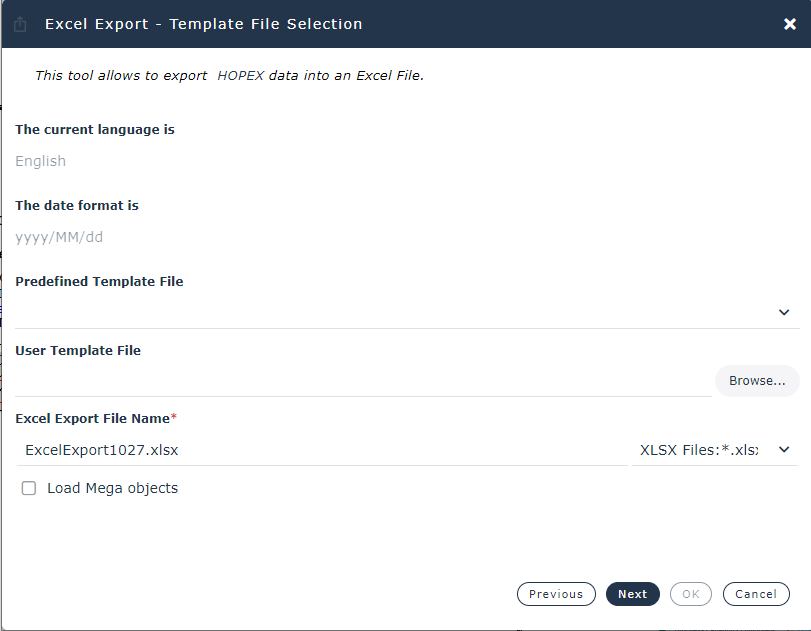
2. Select the file to be used as template:
• Either by scrolling the list of files in the Predefined Template File.
A Predefined Template file is an export file template supplied as standard with HOPEX.For more details on predefined files, see Creating Predefined Excel Template Files(Windows Front-End).• Or by indicating the name and location of a User Template File.
A User Template File is a file created at a previous export.3. (Option) Modify the result Excel Export file name or format.
By default the export file format is .xlsx.4. To reuse objects of the existing template file, select the Load HOPEX Objects check box.