Describing a Logical Application System with HOPEX IT Architecture
A project for describing the logical architecture of an information system inventories the existing logical application systems and their interactions.
 A logical application system is an assembly of other application architectures, logical applications and end users, interacting with application components to implement one or several functions.
A Logical Application System can be described by two types of diagram.
• an application system structure diagram that represents the different components of the application system and their interactions.
 For more details on application system structure diagrams, see Describing a logical application system structure.
• A scenario of logical application system flow diagram is used to describe the exchanges inside the described logical application system in a specific context.
For more details on scenarios of flows diagrams, see Using a flow scenario sequence diagram.Accessing the list of logical application systems with HOPEX IT Architecture
To access the list of logical application systems form the Capabilities navigation pane:
1. Select Logical Architecture in the navigation menu.
2. Expand the Logical Application systems folder.
The tree of logical application systems appears.
Creating a Logical Application System
To create a logical application system:
1. From the Capabilities navigation pane, select Logical Architecture.
2. Select the Logical Application Systems folder and click New > Logical Application System.
The Creation of a Logical Application System dialog box appears.
3. Enter the Name of your logical application system and click OK.
The new logical application system appears in the list.
Logical Application System Properties
The Characteristics properties page for a logical application system provides access to:
• its Name,
• its Owner, by default, during creation of the logical application system, the current library.
• the text of its Description.
With HOPEX IT Architecture, a logical application system is described by the following pages:
• the Properties page, used to specify the properties that appear in the diagrams at the bottom of the described object frame.
• the Structure page provides access to the list of application system components described in its different diagrams as well as the communications that exist between them.
For more information on the components of a logical application system, see Describing a logical application system structure.• the Implementation page is used to specify the logical or physical elements that implement the described logical application system.
For more details on other property pages proposed by HOPEX IT Architecture, see HOPEX IT Architecture properties pages content.Describing a logical application system structure
With HOPEX IT Architecture, the components of a logical application system and their exchanges are described in a logical application system structure diagram.
The logical application system structure diagram, for managing "Internet Purchase Requests", presents different logical applications, access to a logical database as well as service and request points for "Book" or "Order".
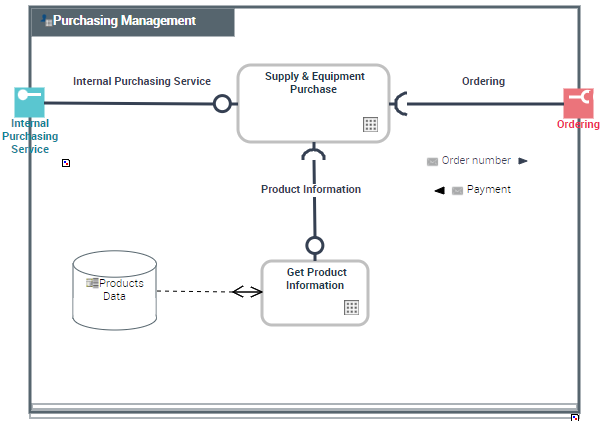
“ Purchasing request Management” Logical application system structure diagram
A logical application system structure diagram includes the following elements:
• end users
The end user represents an organizational unit interacting at the boundaries of an application system or a logical application system.For more details on adding end users, see Adding an end user to the logical application system structure diagram.• Logical Application System Components and Logical Application Components
A logical application is a set of application functionalities that is independent of a particular implementation. For example, the classification of all purchase request processing applications implemented in an enterprise.For more details on adding applications, see Adding a logical application to a logical application system structure diagram.• interactions between the components representing requests for services
An interaction represents a contract established in a specific context between autonomous entities that are internal or external to an enterprise. These entities can be enterprise org-units, applications, activities or processes, as well as external org-units. The content of this contract is described by an exchange contract.For more details on interactions between logical application system components, see Managing Interactions.• service points
A service point is a point of exchange by which an agent offers a service to potential customers.• request points
A request point is a point of exchange by which an agent requests a service from potential suppliers.For more information on access points, see Describing Service and Request Points.Adding an end user to the logical application system structure diagram
To create an end user:
1. In the objects toolbar of the logical application system structure diagram, click End User.
2. Click in the frame of the described logical application system.
An addition window prompts you to choose the Object Type that you wish to use:
3. For example, select the Org-unit object type.
An org-unit represents a person or a group of persons that intervenes in the enterprise business processes or information system. An org-unit can be internal or external to the enterprise. An internal org-unit is an organizational element of enterprise structure such as a management, department, or job function. It is defined at a level depending on the degree of detail to be provided on the organization (see org-unit type). Example: financial management, sales management, marketing department, account manager. An external org-unit is an external entity that exchanges flows with the enterprise. Example: customer, supplier, government office.4. Select the org-unit that interests you and click OK.
The actor appears in the diagram.
Adding a logical application to a logical application system structure diagram
To describe that a logical application system implements a logical application:
1. In the objects toolbar of the logical application system structure diagram, click Logical Application component and click in the frame of the logical application system described.
An addition dialog box prompts you to select the Logical Application used.
2. Select an existing logical application.
3. Click OK.
The logical application appears in the diagram.