Managing Interactions
An Interaction represents the exchange of information between architecture components.
 An interaction represents a contract established in a specific context between autonomous entities that are internal or external to an enterprise. These entities can be enterprise org-units, applications, activities or processes, as well as external org-units. The content of this contract is described by an exchange contract.
Content of an interaction is described by an exchange contract.
An exchange contract is a model of a contract between organizational entities. This contract is described by exchanges between an initiator role and one or several contributor roles. For more details on exchange contract concepts, see Describing Exchange Contracts.
In a “Purchasing Requests Processing” application system structure diagram, two exchange contracts are used by different interactions.
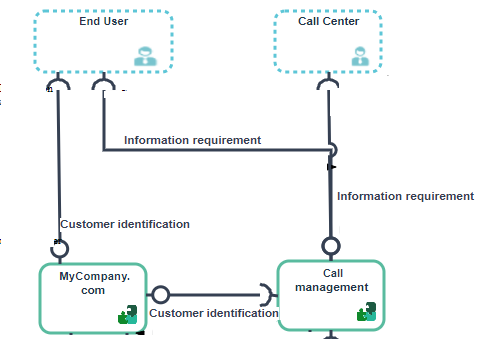
Interactions in the "Purchasing Requests Processing" application system structure diagram
The clients must be identified before entering an order. They can enter orders directly from “MyCompagny.com” application or by using a Call Center. The Call Center uses the “Call Management” application which uses the client identification service offered by the “MyCompagny.com” application.
Creating an Interaction
To create an interaction:
1. In the objects toolbar for a diagram, click Interaction
2. Click the entity requesting the service and draw a link to the entity providing the service.
3. In the add interaction dialog box, specify the exchange contract you wish to use.
You can also create a new exchange contract. For more details, see Creating Exchange Contracts. 4. Click Add.