Describing Service and Request Points
In a service-oriented architecture, communication is based on access points: service points and request points.
 A request point is a point of exchange by which an agent requests a service from potential suppliers.A service point is a point of exchange by which an agent offers a service to potential customers.
Service points
An application system, for example, is created to ensure one or more services. These services are represented by service points.
A service point is a point of exchange by which an agent offers a service to potential customers.The service is requested according to precise terms defined by an exchange contract assigned to the service point.
An exchange contract is a model of a contract between organizational entities. This contract is described by exchanges between an initiator role and one or several contributor roles. For more details on exchange contracts, see Describing Exchange Contracts.
Components activated to assure a service are linked to the service point by interactions. If it is necessary to activate several components, you have to create several interactions between the service point and the system components.
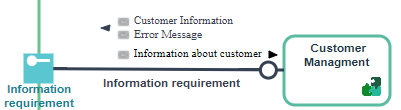
In the example presented here, the IT Service ”Customer Management” is activated by the interaction “Information request”.
To create a service point, see Creating a Service Point or a Request Point.The Published Fulfillments property page of the service point enables the access to the capabilities implemented by the service point that interests you. To create a service point, see Access to implementations from a service point.Request points
A request point enables representation of use of a service external to the described entity.
enables representation of use of a service external to the described entity.A request point is a point of exchange by which an agent requests a service from potential suppliers.The service is requested according to precise terms defined by an exchange contract assigned to the request point.
An exchange contract is a model of a contract between organizational entities. This contract is described by exchanges between an initiator role and one or several contributor roles.For more details on exchange contracts, see Describing Exchange Contracts.Components that issue a request are linked to the request point by an interaction.
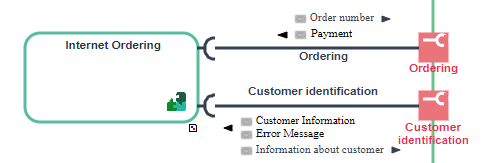
In the example, request points represent requests for service executed by the “Email Order Management" IT service to identifier a customer and issue an order.
To create a request point, see Creating a Service Point or a Request Point.Creating a Service Point or a Request Point
The process for creating a service point or request point is identical.
A request point is a point of exchange by which an agent requests a service from potential suppliers.A service point is a point of exchange by which an agent offers a service to potential customers.To create a service point:
1. In the diagram insert toolbar, click Service Point  .
.
.2. Position the object at the edge of the frame of the described object.
A creation dialog box opens.
3. Click the arrow to the right of the Exchange Contract field to define the exchange contract enabling activation of this service point, and select, for example, Connect Exchange Contract.
A query window opens.
4. Select the exchange contract associated with this service point and click Connect.
5. Click Next.
A dialog box opens proposing a list of exchange contract roles that can be associated with the service point.
This dialog box is not proposed if there is only one candidate role that can be associated with the service point.6. Select the role that interests you and click OK.
The service point appears in the diagram.
Defining the Element Interaction Point
The interaction point of an element connects an interaction to one of the components in communication. This specifies:
• on the one hand, the service point, or the request point, that intervenes in the communication
• on the other hand, the role, consumer or supplier represented by the interaction point in the exchange contract. The graphic representation of the interaction point gives indications on the role.
 | The interaction point is connected to an element playing the supplier role in the exchange contract. |
 | The interaction point is connected to an element playing Consumer role in the exchange contract. |
Characterizing the element interaction point
To modify the properties of the element interaction point:
1. Right-click the interaction beside the communication element.
2. Open the Characteristicsproperties page.
3. Select the Played Service Role, that is the role of the exchange contract played by the element interaction point.
For more details on the roles of an exchange contract, see Creating an exchange diagram (BPMN).4. Select the Interaction Endpoint Target, that is the service (or request) point concerned by the interaction.
For more information on service points or request points, see Describing Service and Request Points.5. Click OK.