Managing your Likes on an Object
You can:
• let other users know that you like an object.
• cancel your Like on an object
When you like an object, you are also automatically added to the followers of this object.
Accessing the list of objects that you like
To access the list of objects that you like:
1. From your HOPEX desktop, click the navigation menu  and select Collaboration.
and select Collaboration.The collaboration features appear in the form of tiles in the Browse  edit area.
edit area.2. Click the My social objects tile.
The page showing the list of objects you like or the list of objects you follow is displayed.
3. In the drop-down menu, select My liked objects.
The object you like are listed by type.
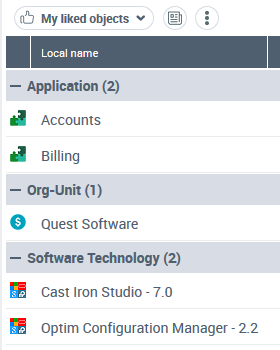
You can perform actions on these objects.
Liking an object (in a list)
To like an object:
1. From your HOPEX desktop, access the list of objects that contains the object concerned.
2. In the list, select the object concerned.
3. In the icon bar of the list, click More  > Like
> Like  Alternative: In the Collaboration window, Social tab, in the Likers section, click Like
  .
.In the Collaboration window, Social tab:
• Likers section, your name is added to the list of persons who like this object.
• Followers section, your name is also added to the list of persons who follow this object.
To stop following the object, see Canceling Follow-up of an Object.Liking an object (in a tree)
To like an object:
1. From your HOPEX desktop, access the Social feature.
The Collaboration window appears and displays the Social tab.
2. Access a tree that contains the object concerned.
3. In the tree, select the object concerned.
For example: an object in your favorite tree.
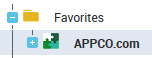
4. In the Collaboration window, Social tab, in the Likers section, click Like  .
.
.Your name is added to the list of persons who like this object.
Your name is also added to the list of persons who follow this object.
To stop following the object, see Canceling Follow-up of an Object.Removing your Like on an object (in a list)
To remove your Like on an object:
1. From your HOPEX desktop, access the list of objects that contains the object concerned.
2. In the list, select the object concerned.
3. In the icon bar of the list, click More >Stop liking  .
.
>Stop liking .In the Collaboration window, Social tab, Likers section, your name is removed from the list of persons who like this object.
If you follow this object, continue to follow it.
To stop following the object, see Canceling Follow-up of an Object.Removing your Like on an object (in a tree)
To remove your Like on an object:
1. From your HOPEX desktop, access the Social feature.
The Collaboration window appears and displays the Social tab.
2. Access a tree that contains the object concerned.
3. In the tree, select the object concerned.
For example: an object in your favorite tree.
4. In the Collaboration window, Social tab, in the Likers section, click Stop liking .
.Your name is removed from the list of persons who like this object.
If you follow this object, continue to follow it.
To stop following the object, see Canceling Follow-up of an Object.