Introduction to diagrams
You can:
• create a diagram from an object
 See Creating Diagrams.
• update a diagram
• manually using the diagram editor
See Editing a Diagram.• in tabular input mode
• display the diagrams relating to an object
• the diagrams describing the object
• the diagrams containing the object.
Editing a Diagram
You can access a diagram in edit mode from:
• the pop-up menu of the object described by the diagram
• a diagram preview
With some diagram types, you can open the diagram in tabular mode, see Building a diagram in tabular entry.Opening a diagram in edit mode
To open a diagram in edit mode:
1. Access the object described by the diagram.
2. Right-click the object and select the diagram type to open the diagram describing the object.
The diagram is displayed in the View window, in edit mode.
If no diagram describes the selected object, see Creating Diagrams. To facilitate the diagram editing, click Maximize
  , to display the diagram in full page.
Switching from diagram preview mode to edit mode
From a diagram preview, you can switch to diagram edit mode.
To switch to diagram edit mode:
1. Display a diagram preview.
2. In the diagram toolbar, click Edit this diagram  .
.
.The diagram is displayed in edit mode.
Diagram Toolbars in Edit Mode
In edit mode, the diagram bars are:
• at the top:
• a diagram toolbar
• a text editing bar
• to the left
• a diagram editing bar
• an object inserting bar
• to the right
• a shape editing bar
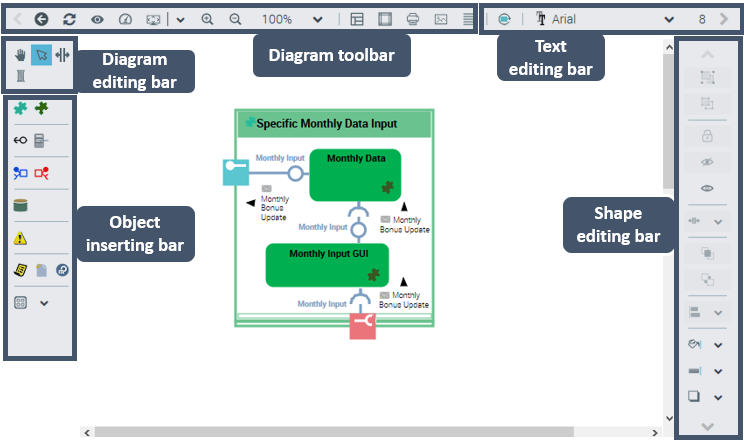
Diagram toolbar (top left)
The diagram main toolbar includes diagram tool buttons.
Icon | Description |
|---|---|
 | Return to the preview of the diagram |
 | Refresh diagram |
 | Views and Details Enables to define the types of objects to be displayed in diagrams |
 | Quality and performance settings Enables to change the image format: SVG (by default), PNG (for a better quality), or GIF (to improve performance) format |
 | Fit to page Fits diagram to the page: - Fit to height - Fit to width |
 | Zoom in/Zoom out Performs a zoom in / zoom out |
 | Zoom value Enables to define the zoom percentage, or to display the full diagram See Zooming. |
 | Display page limits Enables to display the diagram pages |
 | Diagram layout Enables diagram layout |
 | Print diagram Displays the diagram as a PDF file, which enables to print it See Printing a Diagram. |
 | Save the picture as Enables to save the diagram as a picture in *.png, *.svg, *.emf, or *.jpg format |
 | Diagram properties Displays the diagram properties in a pop-up window |
 | Reinitializing components Adds the components created during the diagram initialization |
Diagram text editing bar (top right)
The diagram text editing bar enables to edit each text included in the diagram. It includes the standard text editing buttons and the following other buttons:
Icon | Description |
|---|---|
 | Increase font size |
 | Reduce font size |
 | Rotate left 90° |
 | Rotate right 90° |
 | Word-wrap text Enables to automatically wrap the text to a new line if it does not fit on one line |
 | Automatic width adjustment Enables automatic resizing of the frame according to the text |
Diagram editing bar (left)
The toolbar to the left of the diagram includes diagram editing buttons.
Icon | Description |
|---|---|
 | Move Enables to move the diagram in the page See Moving a Diagram. Enables to zoom using the mouse wheel See Zooming. |
 | Select Enables to select an object in the diagram, then perform actions on this object See Selecting Elements. |
 | Add/Remove space Enables to modify the space between objects |
 | Link Enables to link objects |
Diagram object inserting bar (left)
The toolbar to the left of the diagram includes:
• diagram specific objects that you can insert in the diagram
• objects common to all the diagrams
Icon | Description |
|---|---|
 | Note Enables to add a note to the diagram |
 | External reference Enables to add an external reference to the diagram |
 | Title Enables to add a title to the diagram |
 | Graphical object Enables to add shapes, texts, fields, a title block |
Diagram shape editing bar (right)
The diagram shape editing bar enables to:
• define the position between elements (i.e.: grouping, moving front, aligning)
• customize the line style (i.e.: orthogonal line, color)
Icon | Description |
|---|---|
 | Group Enables grouping selected elements See Selecting Elements. |
 | Ungroup Cancels the grouping |
 | Freeze Prohibits moving the selected element |
 | Hide Enables to hide the selected element |
 | Show all Displays all hidden elements |
 | Front See Ordering Elements. |
 | Back See Ordering Elements. |
 | Align Enables to align selected elements (i.e.: left-center-right, top-middle-bottom, perspective, on grid) See Aligning Elements. |
 | Fill color Enables to set the color of a shape |
 | Line color Enables to set the color of a line or shape outline |
 | Shadow Enables to add shadow to a shape corner (top or bottom, right or left) |
 | Simple line |
 | Perspective line Technical architecture diagram |
 | Orthogonal line |
 | Line style |
 | Curved line |
 | Double line |
 | Rounded angles |
 | Arrow style Enables to define the line extremities |
 | Style of bridges Enables to define the default bridge style or to modify the bridge of a specific line |