Managing Maintenance Projects
In the lifecycle of an SAP Solution Manager project, any change to the solution has to be managed by a separate maintenance project.
The branches of the business processes that need to be changed are checked-out from the solution into the maintenance project.
The project is then modified according to the required changes. After all changes have been implemented, corresponding maintenance projects are checked-in back to the solution.
Maintaining a SAP Solution Manager project therefore requires importing the maintenance project into HOPEX SAP Blueprint.
HOPEX SAP Blueprint keeps tracks of the changes to be able to update the implementation project that gave birth to the solution.
Note that the objects of a scenario that are not checked-out are locked.
Importing a project
Viewing project versions
When importing the maintenance project, versions of the project are created to keep track of the changes made in the maintenance phase.
Technically speaking, versioning entails:
• creating variations
• locking the versioned object.
Flagging objects for check-in
After you have modified an object in the project, you need to specify it is ready for check-in in order to link it to the maintenance project.

This step is necessary so that when concluding the maintenance project the objects are traced back to the corresponding implementation project.
To flag the object for check-in:

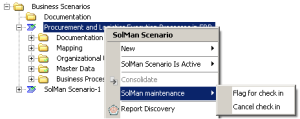
Right-click the object modified and select
SolMan maintenance > Flag for check-in.
Check-out status
The object must be in a proper check-in status to be flagged for check-in.
The statuses that are entitled for flagging for check-in are as follows:
• Check-in confirmed
• Check-in ready
• Check-out confirmed
• Check-out requested
• Checked-out
If the object has a different status, a warning indicating that the check-out status does not allow flagging for check-in appears.
You can view the
SolMan Checkout status in the
Characteristics tab of the object property page.
Canceling check-in
You may decide later on that the object is not ready for check-in.
To cancel check-in:
Right-click the object that was flagged for check-in and select
SolMan maintenance > Cancel check-in.
Concluding a project
To conclude a maintenance project:
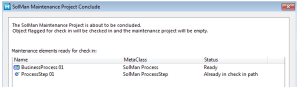
Right-click a project and select
Conclude.
The objects that have been flagged for check-in are checked to the solution.
The objects that are already in the check-in path (meaning their parent is already flagged for check-in) are not processed here.
Impact of maintenance project conclusion on the implementation project
The implementation project is updated with the elements that were flagged for check-in during the maintenance phase.
The maintenance project in HOPEX SAP Blueprint is emptied.
When you update an implementation project from a maintenance project:
• varied objects are disconnected
• variants are connected
Traceability is kept in case you need to produce reports following project conclusion.