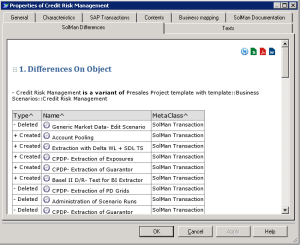
Object Differences Report
This report gives a detailed view of the differences that exist between:
• the current object (the current object from which the report is displayed)
• its originating object (the varied object).
It allows you to determine which elements have been added and/or deleted.
The report can indicate the differences between a ProcessStep (the current object) in an implementation project and its equivalent (the varied object) in a template project.
Accessing the report
To access this report on object differences:

In an object properties dialog box, click the
SolMan Differences tab.
Result
The report comprises two parts:
• the varied object in relation to the current object.

The current object is the one from which the report is displayed.
• a table recapitulating the objects which have been:
• added
The added objects are the objects owned by the current object and which do not exist in the varied object.
• deleted
The deleted objects are the objects owned by the varied object and which do not exist in the current object.