Accessing Report DataSets
Access to the Report DataSets in HOPEX (Web Front-End):
• is similar in all HOPEX Solutions.
• is specific in the Enterprise Architect (EA) desktop.
Accessing to Report DataSets in a HOPEX Solution (Web Front-End)
To access Report DataSets in a HOPEX Solution (Web Front-End):
1. Connect to HOPEX (Web Front-End).
2. On your
HOPEX desktop, click the navigation menu

.
3. Click the Reports navigation pane.
4. In the Reports navigation pane, click My DataSet Reports.
The Navigation edit area lists your Report DataSets and specify the following characteristics for each Report DataSet:
• its confidentiality mode (public/private)
• the Report DataSet Definition on which it is based
• the date and time it was last generated
• its generation time
You can access, create and manage your Report DataSets.
Accessing Report DataSets from the EA Desktop (Web Front-End)
To access Report DataSets from the EA desktop (Web Front-End):
1. Connect to HOPEX (Web Front-End).
2. In your
EA desktop, click the navigation menu
.
3. Click the Repository navigation pane.
4. In the
Repository navigation pane, click
Documentation 
.
The Documentation tree appears in the Navigation edit area.
5. In the Navigation edit area, expand the Report DataSets folder.
Report DataSets are classified in the associated Report DataSet definition folders.
You can access, create and manage your Report DataSets.
Accessing Report DataSets (Windows Front-End)
To access Report DataSets in HOPEX (Windows Front-End):
1. Connect to HOPEX (Windows Front-End).
2. In the Documentation navigation window, expand the Report DataSets folder.
Report DataSets are classified in the associated Report DataSet definition folders.
You can access, create and manage your Report DataSets.
Accessing the properties of a Report DataSet
To access the properties of a Report DataSet:
1. Access Report DataSets.
2. From a desktop:
• Web Front-End: in the Report DataSet list, select a Report DataSet and click Properties 
.
The Report DataSet properties appear in the View edit area.

In the EA desktop, right-click Report DataSet and select
Properties.
• Windows Front-End: In the Report DataSet tree, right-click Report DataSet and select Properties.
The Report DataSet properties window opens.
Properties of a Report DataSet
A Report DataSet is created from objects from the HOPEX repository.
In the Report DataSet properties, the Characteristic page specifies the characteristics of the Report DataSet:
• Report DataSet Definition is the definition on which the Report DataSet is based
• Report DataSet Sharing defines the confidentiality mode of the Report DataSet:
• public: the Report DataSet is shared with the other users
• private: the Report DataSet is confidential to the user who created it.
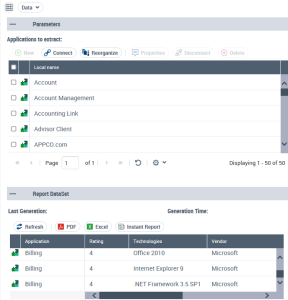
In the Report DataSet properties, the Data page contains the following sections:
• Parameters, which defines the objects to be extracted from the HOPEX repository.
• Report DataSet, which presents the Report DataSet data in table format.
The data displayed in the table is read-only.
For example, a Report DataSet with an "Application technologies" Definition contains the following data for each application selected (objects to be extracted):
- "Application"
- "Rating"
- "Technologies"
- "Vendor"
- "Costs"
- "Number of users".
From the Data properties page, you can:
• perform the following operations:
• launch an instant report