Accessing Objects
You can access an object in HOPEX Explorer from:
• trees in navigation panes
• a search result
• a diagram
• a Properties page
To access an object from a tree:
1. Select a navigation pane.
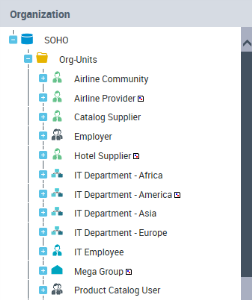
Example: Organization
The tree of objects contained in the selected menu appears.
Example: Org-Units and Sites folders of the environmentappear.
2. Expand the folder corresponding to the required object type.
Example: Org-Units.
Objects contained in the selected folder appear.
3. Navigate in the tree, expand folders to display the objects.
4. Click the object that interests you.
The object properties appear in the read/edit area.