Automatic Updating and Alert
Automatic Update
Automatic update checks, at a given frequency, if properties of software technologies imported into HOPEX have changed in BDNA repository and updates the corresponding technologies in HOPEX.
Defining Update Frequency
To define automatic update on technologies:
1. Click the navigation menu, then Adminstration.
2. Click Tools.
3. Under Scheduler, click BDNA Automatic Update Configuration.
You can set the alert:
• Daily
• Weekly
• Monthly
Subscribing to Alerts
A user can be notified of updates made on the technologies he is in charge of.
To subscribe to an alert:
1. Right-click the technology concerned and select Properties.
2. In the technology properties, select the Wall page.
3. Under the Subscribers section, check I subscribe.
Support Alert Report vérifier
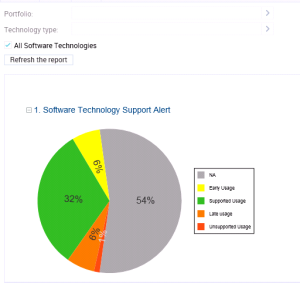
A Support Alert MetaAtribute available on each technology compares the technology life cycle (imported from BDNA Technopedia or defined manually) with its life cycle in the organization.
It can have the following values:
• Early life cycle: the technology has a life cycle in the organization which started before the official release date of the software technology.
• Supported usage: the life cycle of the technology begins after the release date of the technology and ends before the end of the support date.
• Late usage: the life cycle of the technology begins after the release date of the technology and ends before the end of the extended support date
• Unsupported usage: the life cycle of the technology begins after the release date of the technology and ends after the end of the extended support date.
A report uses the Support Alert MetaAttribute to analyse technologies in the HOPEX repository and displays all possible conflicts between the usage of these technologies in the organization and their official life cycles.
To generate a Support Alert report:
1. On the IT Portfolio Management desktop, click the navigation menu, then Reports.

This report is also available in the properties of a portfolio.
The list of reports appears in the Reports navigation pane.
2. In the Technology folder, click Software Technology Support Alert.
The report appears in the edit area.
3. Select the technologies you want to analyze:
• Technologies of a Portfolio. You can select an Application or a Technology portfolio. In case of an application portfolio, it analyses the technologies linked to the applications.
• Technologies of a certain Type (Taxonomy).
• All Technologies
4. Click the Refresh the report button.
The report results appear in the edit area.